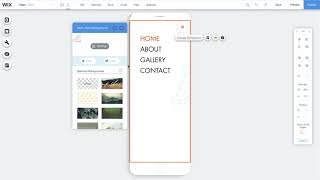
Learn how to customize your Wix mobile menu in the Mobile view editor. Change the menu icon, adjust colors and backgrounds, add animations, and move header elements into the menu without affecting your desktop version.
Chapters
In this video, we'll show you how to customize your mobile site menu to give your visitors a smoother experience on mobile. You'll learn how to change your menu icon, choose a new layout, change the background, customize the design, add animations, and add a Back to Top button. To get started, go to the Editor from Desktop and select Switch to Mobile on the top bar. Any changes you make from here will not affect your site menu on desktop. To change how your menu icon looks, click on it and select Design. Then choose an icon that matches your brand and style. To customize your menu, click Edit Menu. If you want to adjust the position of your menu box, click Layouts. Select Change Background to pick a new color or add an image. You can use any image from your media library. Click Image, select the one you want, and then change Background. Click Settings to adjust the image, opacity and more. Select Animated to adjust how your mobile menu will appear when visitors open it. Hover over each animation to get a preview and click on the one you want. Click Customize to change the direction, duration and more. For a preview, click the Play button. You can also take elements from the header and footer of your site and move them to the menu box. Choose an element like your contact info or social icons. Click Move to and select Menu Box to make it easy for visitors to get to the top of your site. Add a custom Back to Top button. Go to Mobile Tools on the left side menu and click Back to Top button. Here you can choose and customize any icon you want. There are tons of options. Once you're done, click Preview to see how it all looks and publish to go live. And that's it. Now you're ready to customize your mobile site menu to look perfect on mobile. This video is always available, so come back and watch again whenever you need help.