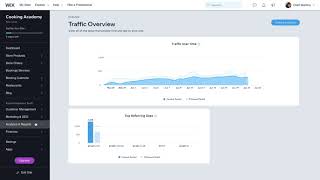
A walkthrough of the Wix Dashboard for new site owners. You'll find tools for managing your online store, bookings, and orders on the left panel, plus Ascend for customer management, Marketing & SEO for email and ads, and analytics to track traffic and sales.
Chapters
Welcome to the WIX Dashboard. Here you'll find all the tools you need to manage your website, grow your business, sell online, drive site traffic and more. Let's take a look around to see everything you can do. All of the business tools added when you created your site are right here on the left. You can manage your online store's product pages, handle orders, check and update your bookings calendar, accept restaurant orders and more. Manage contacts, customer and your business's growth with Ascend Business Tools. Here in the Customer Management Home, you can access all of your site visitors info collected through forms and live chats on your site and in your inbox. You can view, manage and reply to messages, assign tasks to team members and even request a payment. Here in Marketing and SEO, you have access to tools and integrations to help drive traffic to your site, like email marketing and social posts. You can also create and run Facebook and Instagram ads powered by wix's unique AI algorithm. Your dashboard is also stocked with advanced SEO tools that lets you set up and customize all of your site's SEO features and help improve its ranking in search engines. Here's where you can check your analytics and reports to get insights into where your traffic is coming from, how long your visitors stay on your site, and important sales information like which products clients are purchasing. You'll have access to a wide range of reports, giving you the information you need to make more efficient business decisions. These icons at the top right of your dashboard let you know when you have a new notification, like when a visitor contacts you makes a purchase or books a service. To pick which notifications you want to receive, edit the settings right here and in the top left you have access to the WIX Help center, giving you instant answers to your questions. You can also get help from a WIX partner with your design development or SEO. Simply click to hire a professional in the WIX Marketplace. As your business grows, the new WIX Dashboard will change and adapt, showing you how to keep the momentum and take action to get more site visitors, bookings and sales. Take the time to explore the new WIX Dashboard and check out our other videos to learn more about each of the sections featured here.