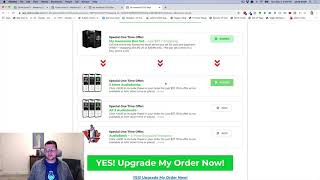
This is a short YouTube demo (creator: Jaime Smith, uploaded July 6, 2022) showing the "Add Remove Products OTO" add-on, which lets sellers present multiple additional offers (OTO bumps) on the same One-Time-Offer page and let buyers add or remove those products from their order. The speaker demonstrates a $97 box-set core offer with domestic shipping $14.95 and international shipping $29.95 (the latter via an "OTO International Shipping" add-on), and explains this lets you extend funnels without adding extra OTO pages.
Questions this video answers
Jaime Smith
July 6, 2022
$97
$14.95
$29.95
Chapters
Foreign. This video I want to show you a quick demonstration of an add on called Ad Remove Products oto. So this is meant for OTO pages only. And if you want the Ad Remove products for order forms, then check out the other add on just called Ad Remove Products. This one's for OTO pages. So we've got an OTO page here and I want to show you real quickly what this add on does. So what we have here is we have an OTO page where we're making an offer for a $97 box set. In addition to that there'll be $14.95 shipping or $29.95 international shipping. And so that's powered by an add on called OTO International Shipping. But what we're looking at is the OTO Add remove products for OTOs. And what that allows us to do is have additional offers on our OTO pages, we'll call them OTO Bumps, for example. So we have these additional products that we'd like to offer. In this case we've got audiobooks or an offer for a chall. And the customer can actually just click add and add that product to the order on this. So they're, they're always going to buy this core offer, but they can also add this additional offer or add this additional offer or add this additional offer. And then the other cool thing is they can actually remove additional offers so they can go in and remove these. And so now they'll buy the core offer plus this additional offer and you can add and remove those products from the offer. So what this allows you to do is basically extend your funnel, make additional offers, but not actually add pages or add one time offers to your funnel. So you can take, Instead of having eight OTOs, you can make multiple offers on the same OTO page and then give the customer the choice of what they'd like to add those things that are complementary to the offer. So that is what the Ad Remove Products OTO does. Very similar to what you see on Add Remove products for the order form only it's specific for OTO pages and you get the same Ad remove feature. So watch the video down below, see how to get installed for yourself and I hope you put it to good use.