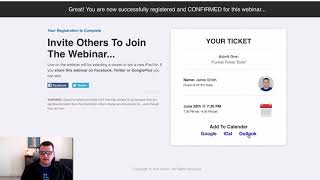
A short demo video (transcript) showing the "Add to Calendar" add-on. The presenters (Jaime Smith and Barry) demonstrate adding event links on a webinar registration/thank-you page that open Google Calendar, iCal (Apple Calendar), or Outlook and pre-populate an event (date/time, Zoom link, description), so attendees can save the live webinar to their calendars.
Chapters
Hey there. In this video I want to show you the Add to Calendar add on and give you a quick demonstration of what that does. And so we've got just an example of a live webinar thank you page here. You can really use this on any.
Kind of page where you want to.
Give somebody a link to add an event to their calendar.
That's a live event.
It's got a specific date and time. Could be on a thank you page.
For opt in, could be a webinar.
Registration page like this one. Could just be any page that you.
Want to highlight an event.
But what we want is we want these links to be able to link out and when somebody clicks them, to actually open up an ad to their calendar. So the three major calendars are Google.
Calendar, Ical, which is like Apple Calendar, and Outlook, you know, which is somebody.
That'S using Microsoft, and add it to your, to your Outlook calendar.
So this add on actually allows you.
To take links, give them a special name and click. When somebody clicks on that link, it.
Will actually open up and add it to their calendar. So for example, if I click on.
This Google link now, it will take me to Google Calendar where it will.
Actually come up and it will show.
Me, hey, here's my event. It's Jamie's awesome event. It's on June 28th at 7:30. It's, it's in Zoom.
It's so it's trying to pull up Zoom.
Barry.
That's a little weird. But it's, it's going to be on Zoom and, and it's going to give.
Me even a little description down here.
And then it automatically adds this little.
Go to calendar in there because that's.
How we're powering this tool.
And so that's what this is all about. So we can then just save the event and it's saved to the calendar.
So hopefully that gives you an idea.
Of what the Add to Calendar event does or the Add Calendar add on does. And hopefully you can see how it.
Would be beneficial in your funnels, especially for those live webinar registration funnels.