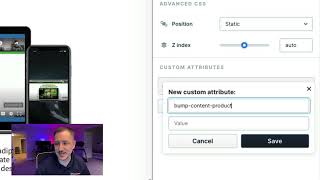
A short YouTube tutorial (CF 2.0) demonstrating how to add a custom attribute to a specific section so scripting can target and move that element. The speaker shows the UI path (Layout → select section → Settings → Advanced → Add Custom Attribute), the required attribute name (bump-content-product) and the product ID value (69692), and notes a follow-up video will cover creating the add-on inside CF Pro Tools.
Questions this video answers
bump-content-product
69692
CF 2.0
Chapters
All right, so for this particular part, we're going to add a custom attribute. So in CF 1.0, we normally add CSS titles, but that doesn't work quite like that inside of CF 2.0. So in order to get the scripting to speak with the sections and move things around the way that we want, we have to create custom attributes for the particular elements that we want to move. So we want to move this particular section, not the row, not the blue, but we want that row. We want that section that's the green one. Sometimes it's a little bit hard to get. So you might have to come up here to layout and then kind of come over here and looks like I might have an extra section in there. We want this particular section. So what you're going to do is you're going to come in here and you're going to click on that so that you get access to the settings. Okay, now that I can see the settings, what we're going to do is we're going to come up here to Advanced and we're going to come over here to where it says cut add custom attribute. So what I'm going to do is I've already added this. Now I'm going to get rid of it so that you can see me add it back in. So what you're going to do is click on add custom attribute. Again, we're here in the Custom tab and the way that I got there was by going to layout, or you can just click on the settings for the row or for that section if you can get it. But I went up to layout and then I came down here to section and then it came up. So I'm going to come over here to the Advanced tab and then I'm going to add a custom attribute. There's already one in here, but we're going to add another. So just add custom attribute and then it's going to be bump content dash product. Okay, bump dash product. I'm sorry, bump dash content dash product. And then the value is going to be the product ID that we picked up in the previous. In a previous video. Right. So here is the information that we're looking for. So it's going to be 69692 and then bump dash content dash product. Do keep in mind, this should be all lowercase there, just like that. Bump content product. So let's come over here. 69692 is going to be our the value there. So click save. Once you've done that, it'll show it here in your custom attributes bump content product 69692. Once you've got that all set, you're set to go there. And what we're going to do, there's only one more thing that needs to happen and, and that is that we need to add. We actually need to create the add on inside of CF Pro Tools. So I'm going to do that in another video. Make sure to click on that video right down below this one and I will see you guys over there and we'll continue this process. And we're almost done. We almost got this. Alright, see you over there.