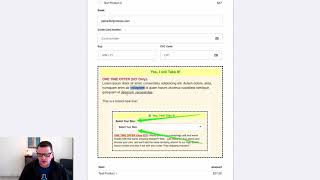
A short YouTube demo by Jaime Smith showing the "bump content" ClickFunnels add-on. The presenter demonstrates how the add-on enables full use of the ClickFunnels editor for order-bump content—allowing rich formatting (headline styling, bold, underline, italics, extra line breaks) and images—contrasting this with ClickFunnels' default, limited order-bump text field. The video ends by directing viewers to installation instructions.
Chapters
In this video, I want to show you a quick demonstration of the bump content add on and the power that it has. And so what this does is it lets you actually use the full power of the ClickFunnels editor to edit the content of your bump offer. And so, for example, we have a bump offer here at the bottom of our order form that actually you can see we've got a, you know, a headline here, big red, bold. We've got some, just some basic text, but we've got some bold in there. We've got some underline, we've got a little italics, we've got line breaks in here, extra line breaks. We've got an image and we've got all this stuff going on that's not what like an order, regular order bump element would look like in clickfunnels. If we go back to our page editor, we can see this is what normally an order bump element will look like inside of ClickFunnels. It's just got a basic red here and then just basic text. No, you can't add any special formatting or anything like that to this text. All you get is this option to edit the line of text. And you can edit this line of text here, but you really can't change much more than that. So that's what the bump content adds for us. It lets us add in all this extra stuff. And so be sure and watch the instructions and be sure how to get this installed for yourself. I think you're gonna really like it.