CF KickStart 6 figure strategy
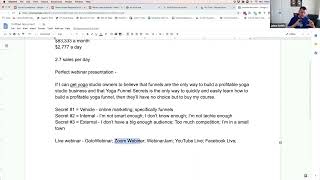
This chunk explains choosing a live webinar to validate a product and practical tool choices to build an online course funnel. Key recommendations: start with live webinars (to practice and test), use Zoom Webinar as the go-to starter platform (GoToWebinar recommended for larger-scale marketing features), and consider YouTube/Facebook Live as low-cost alternatives. Email infrastructure should support both broadcast reminders and autoresponder sequences (tools mentioned: ClickFunnels/Actionetics, ActiveCampaign, AWeber, ConvertKit, Mailchimp, Mad Mimi). Use a landing-page/registration builder (preferably ClickFunnels) to capture registrants, then ClickFunnels or similar platforms (Kajabi, Teachable, WordPress member plugins) to build order forms and host the course. For payments the speaker favors Stripe for ease of setup, and recommends NMI + Gateway Funnel Pros (Alex Roy) for higher-risk or high-volume stores because NMI can load-balance multiple merchant accounts to reduce shutdown risk.
Questions this video answers
Zoom Webinar.
Stripe.
Alex Roy (Gateway Funnel Pros).
Chapters
With a live webinar, we can kind of figure that out down the road. And actually you could deliver that same thing in all those ways. But knowing it up in front, then you can kind of pick which one do we want to start with and how do we want to go. So for us, it's a brand new business. And just real quick, Jeremy asked the question, you're going to cover how to deliver the 48 hour pass in a later session? Absolutely. We will go through how to build out all these different types of funnels. We're gonna kind of step through the foundational stuff. Next week we're gonna go through the hook story offer because again, it ties directly into how you're gonna craft your funnel and your landing pages. That's all gonna go into how to build that sales message, the landing page, the sales pages, the order forms, all that stuff. It's gonna go into that. So we're gonna talk through that on the next session and then we're gonna jump into the kind of nitty gritty of clickfunnels and getting started, getting that all set up properly. And then the following sessions will all of these different types of funnels. So we'll absolutely go through the 48 hour pass funnel as well as the auto webinar funnel, as well as the live webinar funnel, as well as the order forums. We'll go through membership areas and how to deliver the content and all those things. So we'll cover everything it takes to go through and build this business from what we're doing today all the way through to profitable business at the end. And then we will get into the really nitty gritty stuff of how to make it beautiful, how to, how to add the custom CSS, how to add the custom JavaScript specific to ClickFunnels so that you can do the little nitty gritty stuff that can make your funnels convert that much better. And yeah, so we'll go through all those things. And so we've kind of gone through this, we've kind of mapped this out. And so what we look at is say, okay, what makes the most sense for me today with what I have to actually go down this path. So I've got, I've kind of mapped out who it is I'm talking to, what I'm going to create, how I'm going to get to my million dollar a year business. I've got my. And in order to do that, I need to do the perfect webinar presentation and I've got that somewhat Mapped out. So how do I deliver that presentation to my customer, to my prospect at this point? How do I get them in, and how do I deliver that to them today? What's the best way for me to get started? Well, in this case, it's like, okay, the best way for me to get started with this might be just to do a live webinar. Just let me throw it out there one time and see how it works. And so we're going to go down that path of live. So I'm going to do a live webinar because I don't, you know, it might take a few times to practice, and I don't have to practice a hundred times by myself before I see whether it's going to convert or not. If I just can schedule one and. And I can get people to it, which we can figure out through email blasts. We can figure out by doing advertising through Facebook or YouTube videos, or there's tons of ways we can get traffic. I can work with somebody else that's got a big list that's like, hey, I want to help. Maybe they've got. You can work with a JV partner that's got a big yoga studio on their list that they serve in another way. Maybe they help them with advertising. Maybe they help them with delivering T shirts. Or maybe to help them with. Like, if you could reach out to somebody that helps actually build yoga studios. Like, there are things, especially if you were to look at yoga studios, one of the things that's kind of becoming more and more trendy. It's been around for a long time, but now it's being talked about more and more, is hot yoga. Well, hot yoga means you have to have heaters in your facility. So there are people that specialize in installing, in providing heaters for yoga studios. So you could go to a vendor that specializes in that and say, hey, you probably have a list of yoga studio owners that you serve. I would love to help you serve them in a greater value. Would you mind sharing your list with me so I can reach out to them? And I will be sure and mention that, hey, we're connected via you. And I'll send an email out to them that tells them, hey, I want to help them build a better business. It helps your customers. It helps me serve people that I want to serve. And that's one direction you can go down and actually getting in front of the people that you need to serve. And that would be enough, you know, even if you only had, you know, 10, 20, 50 people on a live presentation, it's a great way to get the ball rolling, to get started, get you practice, get you to be able to see how people are going to respond. Answer those questions so that you can see, okay, is this going to be effective and am I headed in the right direction? How is my belief statement working? How's my secret 1, 2, 3 working? Is it hitting with people? Is it connecting with people? Is that really their false belief? Are they struggling with that? And did I help them have that epiphany moment that got them over that false belief? So live webinar, we're going to pick that, we're going to go with that direction. So we know then from a live webinar we need some way to actually deliver that webinar content, right? So that's something that we need people to be able to. Just like we did today, we jumped in on this live session. We need people to be able to join us in a live format. So we need to make sure we have the tools to be able to do that. And so we need to look and say, okay, well, there's a few ways we could do that. We've got tools like GoToWebinar that will help us deliver live webinars. We have tools like Zoom like we're using today. Zoom has a webinar format that we can use and so we could use Zoom. There's tools like Webinar Jam that will help you deliver live webinars. They also have a complimentary product for autowebinars called everwebinar. I'm not a huge fan of Webinar Jam. I would recommend GoToWebinar or Zoom webinars. Those both work great. But GoToWebinars, Zoom webinars, webinar Jam, great tool. Another option is just using a YouTube Live. You could stream your webinar presentation into a YouTube Live room. You could get people to register, get onto an email list, send them an email that says, hey, on this particular day, at this particular time, I'm going to go live in this place on YouTube, go there and watch it and you deliver the presentation. They can interact with you via the chat on YouTube live. So that's another option you could use. You could also do Facebook Live. You know, these again, you don't get nearly the interaction with those. You kind of have to monitor your comments and you might need to help, have somebody help kind of moderate and things like that. But it's a cheap, it's a free way to deliver the content in a webinar style format. It obviously requires that your customers be on Facebook, but that's another way to say, hey, I'm going to deliver this content in a live format at a given time, so you need to show up. And so these are the ways that we could go down. So these are some of. Just some of the tools. And there are others. There are plenty of others. Webinar tools. There's webinar geos like J E O. There is. I'm spacing on a couple of the other tools. I actually met the owner here a while back, David Abrams runs a platform and it's actually a really, really good webinar platform. I've not used it myself, but I've had a talk with a lot of people have used it and they really liked it. But I'm spacing on the name right now, so. But these are just some of the things that you can look at. GoToWebinar is fantastic. Liz Benny uses GoToWebinar for her webinars when she's doing live webinars. We just used for the latest Russell Live webinar, we used GoToWebinar for the funnel scripts. When he did a pitch with Jim Edwards for funnel scripts. For the new lifetime access to funnel scripts, they use GoToWebinar. The reason the big benefits for GoToWebinar over something like Zoom is that GoToWebinar has a lot more marketing tools built in to their platform. So you have a lot more control over the emails, the reminder emails and things like that that get sent out through GoToWebinar. So you can have a lot more formatting. You can make them look pretty, you can send out a lot more of them. You can have specific control over the entire email where when you go to something like Zoom, Zoom is a lot less expensive than GoToWebinar for their webinar platform. I use Zoom webinar. I use it for that reason because I'm not running live webinars all the time. I do them every so often and I want to just be able to use their webinar platform to actually publish straight to Facebook Live. So I choose Zoom Webinar because they have that great integration and it's a little less expensive. The downside of Zoom is that their email reminders are not very customizable. They're kind of ugly. And it's. You get to put a sentence at the top and then their presentation format of the reminder is fixed. You can't change it at all. And then you can like customize a little message at the bottom. But otherwise you Know a Zoom webinar reminder email when you get it, because they all look the same. You can customize the subject line a little bit, but not much. So you're really kind of limited. It's a great tool. And when you use it in conjunction with your own reminder emails through something like ClickFunnels or through your autoresponder service, like, you know, ConvertKit or Mailchimp or ActiveCampaign, stuff like that, then it can work very well. But it's a great tool for delivering the content, not necessarily a greatest tool for email reminders. Webinar Jam is another one. Has great tools for your marketing side of things. I'm not a big fan of the platform for delivering the content can get a little clunky, especially from the presenter side. I think it works well for the consumer, but it gets a little clunky from the presenter side, especially if you're going to have multiple hosts for your webinar can get a little clunky, but it can work well. And once you get in it and it works well for those that love it or for those that use it and have good success with it, they absolutely love webinarjam. So it's another one to look at YouTube live again, super, super simple. You can go live on YouTube, you can share your screen, you can share your video. You can bring other people onto the YouTube live. So there's lots of kind of cool ways that you can use that. And Facebook Live again, Facebook tools are getting better and better. But the way that I use Facebook Live when I want to do something like we're doing today, where I'm actually sharing my screen, but I'm also talking to the camera and I have. You can see my face is I use Zoom webinar and I schedule a webinar, even if it's only me on it. I do a zoom webinar and then I stream that live into a Facebook group or onto a Facebook page. That way I don't use Facebook lives. Like, you can now go to your Facebook Live page and say, hey, I want to go live. And you can either use your camera and just speak to the camera, or you can show your screen, which may work great. If you're just showing a slide presentation for the perfect webinar and you don't want to show your camera at the same time, then you can do a slide presentation to show your screen. You just. You can only do one at a time. So sometimes that's not the greatest. So that's one of the downfalls of Facebook. And again, they don't have the reminder systems, they're not going to send out reminders when it starts and all that. You'll have to manage all that through your own email tools. So these are just some of the tools to look at for live webinars. If you're wanting to run a live webinar, here's some options to look at. I highly recommend Zoom. It is my go to for running webinars today. But gotowebinar is also once you get, if you get to the point where you're, you know, you're building that million dollar a year business and you want to be able to scale that you might be looking at going to, especially if you're going to do live webinars with large scale, you're going to have a thousand, two thousand, three thousand people on at the same time and you want to get as many people in as you can. Then going with a tool like GoToWebinar is probably definitely going to be affordable at that point because you're going to make so much more from that scale of people than the cost of the tool is. And you've got a lot more control over the marketing tools inside of gotowebinar. But if I had to choose, I would start out with Zoom Webinar as my tool of choice for live webinars today. So that's kind of some of the live webinar tools I'm kind of sharing this as the foundation for. Like, here's kind of the tools that we need and to think through. Like, here's the options you need, the things that you need when you're getting this started. So we've got our live webinar tools here and then the other things we're going to need is like, hey, I need the ability to be able to send people emails. Like they're going to come and some way they're going to let me know that they're interested in attending my live webinar. And so I need to be able to collect that and I want to be able to send them emails. So you know, I need some sort of email autoresponder. And so you're going to be able to send reminder emails through all of these platforms. These first three, not YouTube Live, not Facebook Live, they don't Facebook. You can actually set up an event, do a scheduled, excuse me, a scheduled Facebook Live and people can click and say I want to get reminders, but you don't really have any control over those reminders. They're Just going to get a reminder from Facebook that says hey, this event's happening at such and such a time. Don't forget about it. So and YouTube Live probably does the same thing, but I think it's the same, same thing. You can probably, they can probably subscribe to the event and get notifications but you don't really have any control over those. But so we want to be able to send out emails to say hey, great, thank you for registering for the event. Here's how to get access to it. Here's what to expect as well as hey, we're getting ready to go live tomorrow and then the day of hey, we're going live in eight hours. Hey, we're going live in two hours. Hey, we're going Live in 15 minutes. And here's the link to go join us. We'll want some sort of a tool to be able to do that. And so you know, in this case we want some sort of what we call an email autoresponder. That's a way to respond back to these people. And we want a tool that can do broadcasts for a live webinar. It's easier to do broadcasts for a live webinar because you know exactly when it's going to happen. So you can actually go and hit send. A lot of times you can pre schedule those but you can say hey, on this date at this time I want to send an email to this list of people. It will go out and versus somebody signed up and a day after they sign up I want to send them this email and a day after that I want to send them another email. That's the traditional autoresponder method. In this case we will need a tool that has the broadcast ability as well. Like I want to send an email right now or at this particular time to this group of people. So we need that sort of tool and so there's plenty of tools that will allow us to do that. Obviously we have the first with ClickFunnels Actionetics that's you know, great tool of choice. We're probably most, most familiar with that one. But you can also use tools like ActiveCampaign is a very popular one, has some great campaign style tools for autoresponders but will also let you send out broadcast and do things like that. You also got tools like one that I've used for 100 years it seems like is aweber. And so you got AWeber, you've got ConvertKit, we've got Mailchimp. Those are the, those are the big Ones that I can think of off the top of my head. There are, there are a hundred others that I know of. Constant Contact is another one. So these are just some of the tools, some of the style tools. Mad Mimi is another one that Jeremy mentions here. So that would be another style one I'm not familiar as familiar with Mad meaning I know of it I'm not used to personally but I know it's a great tool and I know that a lot of people have used it and had great success with it. So those are just a few email autoresponder tools. Obviously I work with clickfunnels, I work for clickfunnels and I work use clickfunnels in my own business and Actionetics and use their broadcast and autoresponder tools. So that would be my go to for this and I believe we're probably all here have ClickFunnels accounts. So that would be the tool to go with. If you're not using that then that, that's the direction I would look in. But if you're on a, you know, if you don't have Actionetics then you know, certainly you could use one of these other tools and a lot of these other tools will cost you less per month than what Actionetics will cost you. And so if you're on a limited budget then looking at something like after campaign or aweber might be a good direction to go. As long as you have a way to get, get the the registrants email address into those tools and you can craft the emails then you're going to be in good shape. And we're going to look at doing broadcasts for a live webinar. Now when you get to the point of doing an auto webinar we'll be looking at actual autoresponders and you can use any of those. So when somebody signs up to the list within, you know immediately they're going to get this message and then 24 hours later they're going to get this other message and 24 hours after that they're going to different message. And so that's where that autoresponder comes in. So having a tool that handles both of those directions is very important. And Jeremy says with Mad Mimi, mailchimp and Mad Mimi both have three levels to start. So that's a great option if you're just getting started to be able to jump in and kind of get started on the low end. So that's great. So we've got now an email autoresponder and broadcast tool and you kind of have a list to choose from there. And then the next thing is, okay, well, we need a, we need some sort of a landing page for these people to come to, to actually register for the event. Now, if you wanted to, GoToWebinar, Zoom, webinar, webinar, Jam will all provide you with landing pages if you wanted to use them. Landing pages that you can customize to a degree that will allow people to register for your events. So you wouldn't even have to have an external tool if all you were doing is like, hey, I got a list of people that I can reach out to. I've got their emails, I can send them an email. I can send them a link to a registration page where they can register the event. I just need to be able to deliver the live content to them. Then you could use nothing but these tools to get that job done. I wouldn't recommend that. I'd recommend some sort of a landing page software like click funnels so that you can build out the landing page and customize it and put in the strong headline that's going to get people actually register for your event. So I would, I would recommend ClickFunnels there, obviously. So landing page builder, and we're just gonna say clickfunnels, but, you know, you could do WordPress if you wanted to. You could, you know, use the, you know, go to webinar tools. We'll just call that. And let's just put all these in one. So. We'll just call this their registration tools. So we've got the, you know, you need some sort of a landing page Builder, whether that's ClickFunnels, WordPress, go to webinar, you know, could be any of a hundred different softwares that you can build a landing page on. Obviously, ClickFunnels is my top choice for very good reasons, and most of those being the simplicity of doing it. It's what we're gonna cover in the rest of this course, obviously. So that would certainly hopefully be the direction that you go down. But when it comes to mapping out your funnel and the foundations of it, what we're looking at is what kind of tools do I need to get the job done. It's like when you're looking at building a house. Yeah, I need a hammer. You don't have to decide which particular hammer you need to know that I have the tools to do the job. You can figure that piece out later. We're just trying to map out, okay, what, what are all the materials that I need to get started and to head down the right direction. And so we need, you know, we need a tool to deliver the content. We need a system to send emails to let people know when it's getting ready to start. We need some sort of landing page builder, be able to collect that registration. So great, so we've got that. So, and, and let's just say registration landing page builder because that's specifically what we're talking about here, is the registration landing page builder because we're going to deliver this live webinar on another platform. It doesn't, it, the webinar itself is not going to be on ClickFunnels, it's not going to be on WordPress, it's not going to be. Well, it is gonna be on one of these tools, but these are just, we're talking about the registration here. So just because you bought clickfunnels doesn't mean you're gonna be able to deliver a live webinar that, you know, once they've registered, then they're gonna get a thank you page that says great, you've registered. But from there it's all about the email and getting them to, onto this live webinar platform. So, but the next step is, okay, so we've got them to register, we figured out where the audience is at, we find, found a way to connect with them. We've got people to come to our landing page, our registration landing PA and register for our live webinar. We've delivered the live webinar via one of these vehicles, you know, Zoom, GoToWebinar, something like that. The next thing is, well, at the end of that we're gonna tell them they need to go buy something from us. So now we need somewhere where we can build out an order form and that is where clickfunnels is gonna shine for us. And obviously what we're gonna be building out. You do the same thing in other tools. You could build out, you know, put 100 plugins in place and do it in WordPress, you could do it in Kajabi, you could do it in, you know, teachable, you could do it in, you know, all kinds of other course hosting platforms. What's the, there's like Gumroad, you know, there's, there's a bunch of options here to be able to do this. Obviously clickfunnels is my choice and I think it probably would be everybody's choice here as well. But that's what we're gonna walk through. We're gonna teach how to do this in clickfunnels. But that's the next thing we need in the piece of the puzzle, right? We need to somewhere where we can actually build out an order form that's going to let somebody pay us money. And from there then we need to figure out, okay, now we're going to deliver where we're going to host our course that we're going to sell. And this again, I'm a huge fan of just putting this into super simple clickfunnels members area and then also alongside that and we'll get into this when we go more over the offer creation and the hook story offer will talk about all the other things, all the other ways you can deliver value that should go in line with your core. So the core is going to, hey, we're going to host this course whether it's going to be in clickfunnels or it's going to be in Kajabi or we have a WordPress members area with something like MemberPress or we have create a course on Teachable or we use Gumroad to collect something. Gumroad is really just our order form, but we need to host our course somewhere. So Click Funnels is a great way to do that. Kajabi is another tool that we can do that. We could do this in WordPress with something like Member Press, Member Mouse. There's several different member type hosting platforms inside of WordPress. Teachable could be where we host this app. So this is, this is. We've got, we've got to post this course somewhere. We're selling the course, we've collected an order for it through one of these tools. Now we need to actually host it somewhere. We need to give somebody access to that. So obviously the more we can use the single tool in the process, the better it's going to be. So that's why we can use Click Funnels for all of these things. You know, we can use it for our email autoresponder, registration builder, order form builder, our course hosting, all that stuff. And so it just keeping it in one tool and having that consistency, definitely there's some huge bonus there. So. But these are the things that we need to figure out in advance, like where am I going to do all this stuff at? Like if Click funnels at the 297 level is too much for autoresponders, then maybe I have to use a different email tool. Maybe I can't afford to do clickfunnels at all. So I need to figure out how I can do this with WordPress and maybe I need to figure out how I can do this on teachable or whatever. You know, these are the things you need to think of in advance so you at least know that, hey, when it's time to do this portion of the business, here's the direction I'm heading in. We've got our course hosting and then I think that pretty much covers us for there. We've obviously still got our email tools, we've got our order form building, we've got our course hosting. Now we've got the framework for it. Looks like Taj jumped on Todd, it's good to see you. Now we've got our framework of things, kind of our assets that we need. We figured out, you know, what is it, where, who's it going, who are we going after? We figured out we're going to create a course for them. We want to get to a million dollar a year business. So that's, you know, 83,000amonth, you know, almost $3,000 a day, a little less, excuse me, a little less than three sales per day. We're going to deliver that via, you know, we're going to be able to sell that number by doing some sort of a perfect webinar presentation. We've got our domino statement, we've got our secrets, and we figured out that we're going to do this via a live webinar. So here's some of the tools we can use. We also need to be able to send emails so that we get people to the live webinar and follow up them after the live webinar as well. And then in order to deliver that live webinar, we need to get them to register for it. So we need to have some sort of a landing page so they can register. And then once they've attended the live webinar, we need to be able to sell them the product, which means we need to collect the payments and then once they've collected payment, we need to be able to deliver the course. The other thing that will need it here is some sort of a payment gateway. It's great to have an order form, but if on that order form you don't have a way to collect credit card information or you can't actually get that payment from them, then what's the point? Right? So there we have options with stripe, we have nmi, we have, you know, although we can't use it with clickfunnels anymore, we've got Braintree, we've got PayPal, and you know, these are just some of the These are just a few. There are tons of payment gateways. You can, you know, authorize.net you know, you can do all kinds of mechanisms here for this. So. But my, the one that I use, the one that's easiest to get set up and going is Stripe. Works perfectly with Click Funnels. Some business, some business models you need to be a little careful with Stripe, you know, they're not huge fans of selling from, you know, what they call pseudo pharmaceutical supplements, things like that. Although they have started to loosen up a little bit that first on that for certain businesses. But when we're talking about courses, Stripe is a good direction to go in. The thing that you want to keep up on top of is when you're starting new business, just make sure that you're doing a good job selling, you're actually delivering. Because what you don't want to end up with is, hey, you sold a bunch of stuff, but then you got a bunch of disputes because you didn't deliver on your product and now they come in and shut your account down. But you're going to rock that out of the park. So Stripe is a good direction to go in. NMI is another one. If you've got a little bit more of a high risk business, NMI is fantastic. You can work with a company called Gateway Funnel Pros. And this is Alex Roy. And so if you ever need somebody to help you get a payment gateway set up and you can't work directly with Stripe and you can't work, you know, use one of the other tools you want an actual credit card processing platform, then Gateway Funnel Pros is a great way to go. His name is Alex Roy is actually who we work with quite a bit at ClickFunnels as well and is probably the only person that we recommend for this. And what Alex will do is actually work with you to set up a merchant account or multiple merchant accounts with different banks. So they'll work directly and say, okay, here's the merchant account you need. And then we're going to help you get set up with NMI so that you can integrate with ClickFunnels. And so the great thing about NMI and using your own merchant account is that you could go and say, hey, I know this business is going to take off and I know that I want to be able to scale it and I know that I'm going to eventually run enough volume that some, somewhere along the way I'm going to have issues with PayPal or Stripe for some reason. So I want to avoid that up front or my business has kind of outgrown PayPal or they've outgrown Stripe and I'm afraid I'm going to run into issues. So you can reach out and get your own merchant account where you actually have a relationship with a bank that is going to handle your credit card processing. And then you can go to nmi. NMI is a gateway. And NMI will let you put multiple merchant accounts, attach multiple merchant accounts to the same payment gateway, and they will then basically pass the credit card information from the gateway, which is nmi, to your merchant account. The merchant account will actually correct collect the money from the person's credit card company and then they will deliver that money back to you via transfer to your bank account. And one of the great things about NMI is they will actually do load balancing. So if you ever get to the point where you're running a million dollars a month through a business, the worst thing you can have happen is that for some reason that merchant gate or that gateway or that merchant account comes along and says, hey, we had, you know, five disputes on your account last month, so we're go ahead and shut your account down. And now you've got a million dollars a month that you've been transacting that, all of a sudden you can't transact anymore. And if you've ever listened to Russell speak, he's actually talked about this, this he almost went bankrupt several times. But one of the times was due to the fact that their merchant account came along and said, hey, you've had enough credit card refunds and disputes here that we're just going to shut down your merchant account so they can no longer collect any money. And they put a hold, I believe it was a 6 month or a 12 month hold on the money they had already collected, which was at that point hundreds of thousands of dollars, and said, okay, just to keep things safe, we're going to hold on to this money for the next six months and then once nobody else disputes it, we'll release that. Well, in the meantime, you got no way to collect money and you can't actually take the money out you've already earned. So you're pretty much screwed. So what happens? What if you're, you know, if you're working with somebody that's running a large enough volume to make, to have it make sense, you can actually set up work with Gateway Funnel pros. They'll help you set up multiple merchant gateways, run them all through NMI. You have one NMI gateway in ClickFunnels and then NMI can actually load balance those transactions so that the first transaction goes through merchant account one, the second transaction goes to merchant account two, the third transaction goes through merchant account three. So now you've distributed that money amongst different accounts, you've distributed the risk amongst different accounts and if any one of them were to ever get shut down, you've got two others that you can continue to collect to or five others or you know, however you want to do that. But that's one thing that a lot of people weren't aware that you could actually do. But it's a good thing to know, especially if you're servicing and building funnels for other customers. Especially if you want to get into higher volume, higher revenue, high scale things like E commerce where you might be transacting millions of dollars per month in revenue. The last thing you want to have happen is your merchant account gets shut down and you can't collect any money or they put a hold on that money. So being able to distribute those transactions, you know, in three different accounts means that you've only, you've only got a third of your revenue ever tied up in one merchant account at any one given time. So you've always got availability in the other two. And then if one gets shut down, you can load, balance it out. So something to be aware of there. So that's how we collect our money. And so, so yeah, so those are the kind of things we need to actually build out the funnel to be able to deliver the course, to be able to sell, you know, collect the orders and to actually be able to collect the money. And then with each of these, you know, the whole point of Stripe is, you know, you connect your bank account to stripe. When stripe collects enough money, they send you a, send you a deposit. So every money, every day you'll hopefully be collecting orders and every day they'll be sending you a deposit straight to your bank account. So it makes it super easy. Same thing with nmi. NMI is just a gateway. You're going to have your own merchant account in the merchant account will collect the money for you. Then they'll send you a, send you a deposit on a regular basis. PayPal collect the money, go straight into your PayPal account. Then you go into PayPal and you do a transfer from PayPal into your personal bank account or your business bank account. Braintree works in the very much the same way. Authorized.net is kind of a gateway and merchant account all built into one. They work exactly the same way. They collect the money, they send it to your bank account. So it just works well, let's see here. So that kind of goes through and covers the basics of what we need to look at. How do we build a million dollar a year business? It's not going to go, we're not going into the nitty gritty details, the graphics and things like that. We'll get more into those when we get into the design component, like how do we make good looking funnels. We'll talk about the other tools we use. And you know, Aaron, I know is probably using a lot of these things off the bat which is, you know, you know, things like we don't have to get into Photoshop, but there's plenty of free tools that you can use to quickly create graphics and there's, you know, you can go to Fiverr, you can go to a really good designer, you can get, build good relationships, there's Facebook groups that you can get into where you can have people that will help you out with the graphics so you can get good looking funnels. So we're not going to get into the nitty gritty of all the tools that go into this. But I wanted to at least cover today the highlights of how do we start thinking about our business and what are the assets and tools we need to start with domain name, get a logo made, think about your business, craft your offer and we'll go more into the actual full on offer in the next session. But then start thinking about my presentation, start thinking about how I'm going to deliver this initially and then how am I going to collect the offer. Is this all making sense so far? I think now is probably a good, good time to stop and see if there's any questions, anything that I haven't covered that you have questions about relating to this, foundations.










