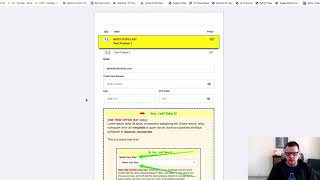
A brief screen-recorded demonstration (voiceover) showing the Check Button add-on for CF Pro Tools. The add-on inserts a required checkbox onto a form’s submit button so users must tick to agree (e.g., to terms) before submitting; the demo shows the UI blocking submission and displaying a shaking error message until the box is checked.
Chapters
In this video I want to show you a quick demonstration of the check button add on and what this does, it actually inserts a checkbox onto your submit form button so that someone will have to check the box before they're able to click the button to submit their order or submit an opt in. And it's great for things where you might want to make sure that somebody actually checks and agrees to something before they continue the process. So in this case I can go in, let's say I'm on my order form here. I'm using a couple of other add ons on here as you might see. Bestseller, highlight cart mode, bump content, all kinds of fun stuff. But if I fill in this order form and I just throw in here, you know what we're going to do, we're going to grab our test number up here. There we go. Copy that. And then we're just going to paste that test credit card number in. 0, 1, 2, 3 and we're going to put in 1, 2, 3 and that's close enough. And then so now I've got, you know, I've got my product selected, I'm ready to submit my order and, and I can come down here and click the button and oh, I can't submit, I can't do anything. And it even shakes the little message down below to let your customer know that hey, something is not right. So in order to continue I need to check the box and then I can click complete order. So that's what check button does. It adds that checkbox to your submit form button. So the customer has to check that box before they can actually submit the form. So hopefully you will find that useful and we'll see you in the next one.