This content was created by Jaime Smith. This content was uploaded by Jaime Smith. This is a YouTube video titled "Date Replace Pro With Math :: Demo :: CF Pro Tools" created on July 19, 2022, demonstrating the functionality of the Date Replace Pro with Math Add-on, which dynamically updates dates on a webpage based on the user's local date.
Chapters
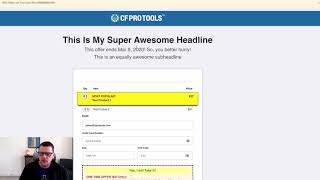
Hey there. In this video, I want to show you a quick demonstration of what the Date Replace Pro with Math Add on does. And here's an example of how you might use it. So in this example, I want to have a headline that highlights the fact that this offer ends tomorrow. And I might want that tomorrow to rotate day by day by day and always be ending tomorrow a day in the future from today. But I don't have to go in and update my order form every time that I want to see that date change. And so I want it to die dynamically change based on the customer's date on their computer locally. And so we want to be able to just kind of basically insert little placeholders, you know, and say, okay, this is the month, this is the day, this is the year. And I would like for this to automatically get replaced and add a day to it. So I don't want it to be today, I want it to add a day or I want to add a week. You could do that. And so, and this is what our output looks like as of today. You can see from my clock up here, it is March 8th, but the date says this offers March 9th. So the add on is actually taken and added a date to it. And then it displays our little chunks. So we can see in here that we've got the month, mmm equals the month, which we output as March. And then the D equals the day, and we can see that outputs the ninth, and then the yyyy outputs the year. And then we see 2020. And so that's what Date Replace Pro with Math does. It gives you the ability to add and or subtract units, the current date and then output those placeholders onto your page. And then the other thing we can do is actually set this so that it is hidden by default. So it's hidden there. And then we save our page. And now when we load the page, it actually waits until that date has been replaced. We've done our calculations and the date has been replaced. And then it shows that that section so that the user doesn't see the placeholders, they actually only see it once the date has actually been replaced. So that's the date Replace Pro with Math Add on. And I hope you like it.