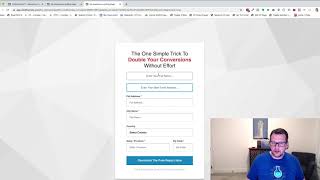
This is a short demo video by Jaime Smith showing the CF Pro Tools add-on named “Disable Repopulate.” The presenter demonstrates a basic web form that normally auto-fills previously entered values on refresh, then enables the Disable Repopulate add-on in a CF Pro Tools account to prevent the form from restoring prior inputs. The video emphasizes use cases where multiple users share one device (events, kiosks, iPads) and need the form cleared between users.
Chapters
In this video, I'm going to do a quick demonstration of an add on called Disable Repopulate. And I want to walk through real quickly what that is, what it means and how you might use it. So in this example, we've got a form here, just basic form. And we filled in previously our name, which is testing. Enter your full name here. So we'll just put in testing and then an email address. And so we've got that filled in here. And now what we see is if we refresh this page, that automatically repopulates on that page. Every time we refresh, it will automatically repopulate. And this is great except for in the scenarios where you might be at an event or something like that, where you might have multiple people coming back and using the same computer and going to the same form. So if you're doing a kiosk, if you're in an event, you have little iPads, you want people to keep going back. You don't want to store the last person's data on the form, so when the next person comes through that it shows up again. And then you have to clear it out and retype it and do all that stuff. You don't want that to happen. So I create a little add on to use just for that scenario. And so it's called the Disable Repopulate. And so I'm going to go into my CF Pro Tools account and I've got one of these add ons already created and installed. I'm going to enable it. I've already got it installed on my page, so it's enabled now. And now if I refresh my page, you'll notice that I do not get that, that repopulate. So, so let's put in here Jamie and we'll do jamie@co tools.com we can go down and do some of this other stuff. We'll go some of these other fields. Let's refresh this page. Now we don't get that data back again. So that's what Disable Repopulate does. It disables the repopulation of that data on your form so you can use it for things like events and kiosks. So that if you've got multiple people using the same form on the same computer, but it doesn't automatically restore the data that was already previously here. So hopefully you like it, hopefully you put it to good use.