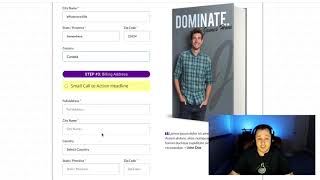
A short demo video by Matt (CF Pro Tools) showing the CF Same Billing add-on for ClickFunnels order forms. The video explains a checkbox that, when selected, auto-populates the billing address fields from the shipping address (including country, state/province) to simplify checkout for physical-shipping products.
Chapters
Foreign. Hey, what's up? It's Matt here with CF Pro Tools and I want to make a video to show you guys how the CF same billing add on works. Okay. This one's real simple. It's going to make the user experience much better in some cases. If you guys have a physical address or if you have like a physical shipping address and a billing address that you need to collect for your customers, maybe you're selling like something like a book or something. And it works. Works like this. Say somebody needs to put in two things like this. They're going to put in, you know, whatever, whatever's ville and somewhere in Canada or wherever. And then maybe they'll select all this information and they're like, hey, you know what? My billing address is the same. I don't want to fill all this out. This. Then they just select the checkbox here. And I'll show you how to create all this coming up. And then everything just auto populates everything down to the country, the state, province, and everything down here. Okay? That's how it works. If you guys watch down here in the next video, I will show you guys exactly how to create this. Okay, I'll see you guys in the next video.