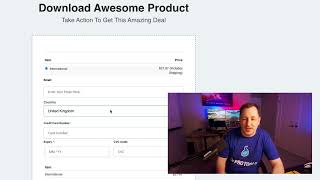
Matt from CF Pro Tools demonstrates the International Product Swapper add-on: it lets merchants combine multiple country-specific listings into a single product and show different product variants/pricing based on the buyer's selected country. The presenter explains domestic vs international settings (example: US domestic price $9.97 vs UK/international price $27.97 that includes higher shipping), and notes the add-on works with both one-step and two-step shipping forms (two-step lets buyers select country on step one and then see country-specific products on step two). He directs viewers to fuller step-by-step tutorial videos and offers support.
Chapters
Foreign. What's up? It's Matt here with CF Pro Tools and in this video I'm going to show you guys a quick demonstration of a new add on that we've created and that is the International Product Swapper. So if you guys are having issues with forced products or international shipping or maybe you're having issues with multiple products being sent over to Shopify or something, this might be a good alternative for you as what it's doing is allowing you to kind of combine everything into one product and then all the consumer has to do or the buyer is select what country they're in. And you set a domestic country, it might end in international country. So whatever you set as domestic will get one product. So if us is in my case is considered domestic. So I created a product here and this is 997. Okay, great. Whatever product that is, it includes shipping. That's cool. And then if maybe I'm from the United Kingdom, that's overseas, that would be considered international. So if they select that, it might show the same product with a different, a different fee which is 20, a different price which is 2797. So in this scenario, in this example, we're just considering this the same product, but it has a shipping fee included into the cost of this. So based on what country is selected, we'll determine what products that they see. All right. This will work on a one step shipping scenario or shipping form like this or will work on a two step shipping product as well. So a perk of using it on a two step is the fact that they select the country on step one and then see the products on step two. So they won't actually know that there's two different sets of products. So. Okay, hope this helps. If you have questions, of course, let us know. Please watch the tutorial videos. I've made a bunch of videos that show you exactly how to set this up step by step and that will help demystify the entire process. Okay, hope this helps. I'm always there for you and support if you need anything. I'll talk to you guys soon.