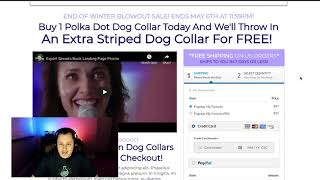
A short demo by Matt (CF Pro Tool support) of the new PayPal Plus script built for the SASE version of CF Pro Tools. He demonstrates selecting core products, adding bumps, and switching payment methods (PayPal, Stripe, NMI). The script creates its own container and supports multiple bumps and grouped products, and integrates with promo codes and international shipping; at recording time it does not work with Cart mode. Matt also notes configurable button styles and the option to remove PayPal Credit, and shows the PayPal modal checkout/login flow.
Questions this video answers
August 1, 2022
Matt from CF Pro Tool support
PayPal, Stripe, and (should work with) NMI
Promo code, international shipping (CONUS noted), and grouped products
Cart mode
Chapters
Foreign. Hey, what's up everybody? Matt here with CF Pro Tool support and today is a big day. I'm going to show you guys how to use the brand new all new improved PayPal plus script that's been created specifically for the new version, the SASE version of CF Pro Tools. Alright, so without further ado, let's, let's jump into this and I'll show you how it looks, how, how it works. So if you guys want to take credit card or you want to take Stripe and it should work for NMI as well. So if you want to take one of those two and PayPal all at the same time, you guys would use the PayPal plus script. Right now I'm using a two step order form. I'm actually going to skip through this. But most of your users would just put their full name, their address. If you're asking, I've hidden all the order elements but depending on what you want, you would actually have all of your order elements on here. And then click let's get started. I'm just gonna flip past there and you'll see this is it guys. This is it. So the new version creates its own container and you can flip back and forth from the product. Say I want this. You can create numerous core products and you can have your bumps. Alright, so this is really cool. You can even have the multiple bumps Guys, what's really cool about this, this new and improved version works with most of our other add ons where they did not before. So this will work with the promo code, plus it'll work with international shipping Conus. Oh, Conus Shipping. This will work with grouped products. Guys, this thing is almost endless. The only one that it currently doesn't work with as of the time of this recording is Cart mode. And we're working on a way to make that work as well. Okay, I'll say that again, it currently does not work with Cart mode. Alright, that being said, I would, I'm going to jump into this and let you guys see how this works. But you can use the, you can select which core product they use. Say that one's 97 bucks and they're like oh, I want to pay with PayPal. And then it just drops down so it stays with this product name and this and then you've shows the price and then you can, you can put a bump on there. Bump product. And as that's really pretty much the how it works, you click that. What's really cool is you can change the button styles, you can take the Paypal credit off if you want and I'll show you how to do that coming up in our configuration videos. And then you can make your payment payment by clicking on the payment button. And then the the modal pops up, it logs you into PayPal and then you can make your payment from here. It's totally amazing. Get into the configuration and show you guys exactly how this works. And I can't wait to show you guys this. This is going to be awesome. I'll see you guys in the next video.