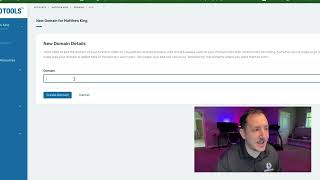
Short YouTube tutorial by Jaime Smith explaining how to add a live root domain to CF Pro Tools so add-ons function. Key instructions: add the account's Domains tab, enter the root (no www or subdomains), click Create Domain, and verify spelling — incorrect entries prevent add-ons from working.
Chapters
Foreign. The very next thing that you're going to want to do is add your domain to CF Pro Tools, your live page where you're going to have this add on installed. So you're going to go into your account inside of CF Pro Tools. You're going to go to the Domains tab over here and you're going to add a new domain. Make sure to add the live domain where you're going to have this set up your live domain calm. You don't need the www in here, your subdomains do not need to be in here. You just need your root domain wherever you're gonna have these pages set up and click Create Domain. Double check the spelling. I've seen that many times where the spelling was incorrect and it didn't work. All they had to do is go in, delete it and then re add it and everything was good. So make sure to do that or none of the add ons will actually work. So make sure to take care of that step and I will see you guys in the next step. Take care.