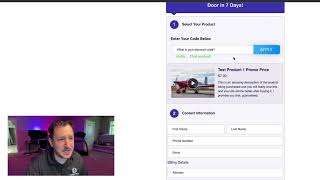
A short demo-style YouTube video by Matt (CF Pro Tools) showing how Promo Code Pro 2.0 integrates with CF 2.0 checkout elements. The video demonstrates creating a promo-code container, moving it into one-, two-, or three-step checkout elements (using Magic Mover/CSS id), applying codes, and how valid codes replace products while invalid codes return an error. The presenter notes compatibility with core and one-off priced products, possible issues with variants, and that it supports multiple products.
Chapters
Hey, what's up everybody? It's Matt with CF Pro Tools. In this video I'm going to show you guys real quick demo of how the new promo code Pro 2.0 works with CF 2.0. So as you would imagine, it works very similar to the way that it works in CF Classic. So you can actually go to. We can actually create a container outside of the checkout element and then we move it using Magic Mover into the two step or into the checkout element. And it works with a one, two or three step checkout element as well. If you have the CSS id, you can move it in here pretty much wherever you want. If you want to take the time to figure out what the CSS ID is. All right, so where it is now, you can see that once you're here you just have to put in a code, hit apply and it'll apply that. If you put the wrong one in, hit apply, it says no such code. You can see they went back to the $27 one there. And then when you type in the good one, you can hit tab enter or just type the. Hit the apply button and it will work and it will re. It'll replace one product with another product. Here is what it's really doing. So it's just like CF Classic in that manner. It work with your core products, your one off priced products. It may not work very well with your variants. So if you do happen to do some testing with variants, do let us know what your experiences are. But other than that, that's how it works and it will work with multiple products as well. Alright, so let's see, we'll see you guys in another video where I'm going to continue walking you through the process of setting this up.