A short how-to/demo showing how to install and test a 'bump quantity' add-on. Speakers create a new add-on inside CF Pro Tools, copy the generated script, paste it into a ClickFunnels page via Settings → Tracking Code → Footer Code, save, preview, and demonstrate that selecting 1/2/3 generates corresponding dynamic rows (each row set to required). The video is a hands-on walkthrough of setup and verification.
Chapters
Foreign. Piece and we'll be done with this.
So if you're inside of CF Pro Tools, inside of your account, what you're.
Going to do is click on add.
Ons and we're going to create the.
Actual add on itself and install it. So you're going to click on.
You can click on my add ons.
You can go anywhere. As long as you're in the add ons area.
You're going to click on Create New.
If you're on your dashboard, you can.
Actually just click on Create new add on. Like that.
Okay, you're going to do a keyword search for.
I would do bump fields and then.
Bump quantity fields comes up here.
Click on that and you'll see all.
The instructions, all the videos that you're.
Probably sitting here watching right now. I've already figured this part out.
Give it a name.
There is no setup, so all you.
Have to do is name it and literally just click on Create add on just like this and it will give you a script like this.
We're going to grab that script, do.
A command C or copy code. You can just click on that and that's it.
We're going to go back over into.
Clickfunnels and let's see, we don't want this. I'm just going to get rid of that. Leave.
And then we're going to come over.
Here, we're going to click on settings.
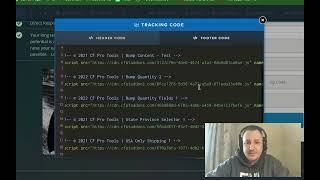
We'Re going to click on tracking code and then we're going to click on footer code.
Alright, so here you should have.
I've got a few add ons already.
Installed per the previous add ons that.
You should have already installed.
You should have order summary, bump content, bump quantity.
And what we're going to do is.
Leave some space down here for bump quantity field. So right below bump quantity you'll be throwing in that script, the one that.
I just grabbed and I just put.
That one in there.
I've got a couple other ones in here as well, but those ones shouldn't matter.
So order summary, bump content, bump quantity.
And bump quantity fields. Let's go back, click the save button and hit that preview button.
We'll see if it worked.
Alright, so the moment of truth.
There's nothing down here.
We click on toggle 2 step.
Alright, so if somebody grabs that bump, they click here it says yeah, select one, select one, two or three.
I'm going to select one and boom.
There it comes up with the first.
Attendee and the email address. And then if they select two, guess what it comes up with two blocks.
There, and if they select three, it.
Comes up with all three of them.
So those are the three rows that we just created.
They can now go through add in that information. You can add in other fields if you want in here to make it, you know, if you need to put a note or do something else.
All three of these field all six.
Of these fields are now set to required as well. Okay.
That's how it works.
If you have any questions, please feel.
Free to hit me up atsupport support.
Fprotools.Com and I'll see you guys in another video. Take care.