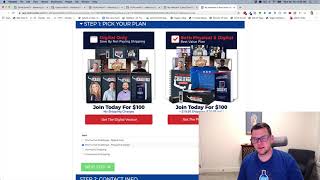
A short demo video (YouTube) by Jaime Smith showing the 'Select Product On Click' add-on for CF Pro Tools. The presenter demonstrates clicking images/buttons on a funnel page to switch the selected product (e.g., digital-only vs physical+digital), and mentions combining it with a 'toggle on product' add-on to swap visible images. The video promises setup instructions in the linked walkthrough.
Chapters
Foreign. Hey there. In this video I want to do a quick demonstration of an animal called select product on click. And what this allows you to do is actually do exactly what it says, select a product when an element is clicked on the page. So it could be a button or in this case could be an image. So we're going to show you an example of a little funnel hack of the One Funnel way Challenge funnel. So I've kind of recreated that one funnel away challenge type funnel. And one of the things that's in that a lot of people like is this ability to click on an image and actually change which product is selected. So now normally we wouldn't see this product selector, but I've got it here just so you can kind of see for example what's happening. So when I click on this digital only version then we can see it's picking my profile challenge digital only product. And if I click on the physical and digital, then it's click selecting that physical and digital version of that product in my product selector. Now I've got another add on installed here as well, the toggle on product that's swapping images that are actually shown on the page based on what I click on and which product is selected so that you can use together to get this effect. So use a couple of add ons. This one we're going to be showing you now is the select product on click. So when I click this element it's going to change my product and then my combination. My flip side is when this product is selected, swap so that the checked version of this image is visible and when I select my other product it's going to swap and make this checked image available and visible on the page. So but the big one we want to do is how do we set up and how do we actually make it so that when I click on this image it selects a different product. So that's what this add on does. And watch the video down below and it'll show you how to get set up and how to get it used on your own funnels. So hope to see you in the next video.