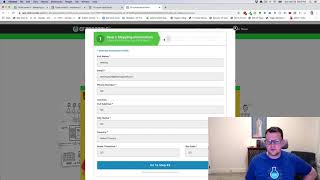
A short demo video by Jaime Smith showing the 'Toggle On Steps' add-on for two-step order forms. The add-on toggles visibility of elements (images or other elements) depending on whether the user is on step one or step two of an order form, demonstrated inside a popup with a custom header image and CSS adjustments.
Chapters
Hey there. In this video we're going to do a quick demonstration of the add on called the product or I'm sorry, the toggle on steps add on. And what this does is that if you've got a two step order form, it allows you to actually toggle the visibility of elements based on which step of the order form that somebody is on. So for example, you might have seen this on the Traffic Secrets funnel. I created kind of a duplicate of that funnel. Here I've done a little bit funnel hack and I've recreated some of that functionality and I want to show you a quick demo of the toggle unsteps add on on this funnel. So if we click this, it's going to open up our pop up. And inside this pop up we've got a two step order form. But you might notice that the header above this looks quite a bit different than normal two step order form element. And that's because this is just an image. So we get a little code that hides the basic header for the two step order form. Little custom CSS does the trick there. And then I want to toggle this graphical version of that step one, step two, this one looks quite a bit better, quite a bit cleaner. And so we want to see when somebody goes from step one to step two, we want to see that change. So we just fill in step one here and click go to step two. Now we can notice we have flopped this. The way this works is these are actually two separate images and one's hidden when you're on step one. And then when you go to step two, it hides the first one and shows the second one. And you can do this with product images. You could do this, all kinds of things, whatever you want to have, where you might want to have an image or an element that you're changing the visibility based on whether somebody is on step one or step two of the order form. But that's how this one works. And again if we click to edit step one, we go to step one and if we click to go back to step two, it just changes that visibility of the elements. And that's what this add on does. So I hope you like it.