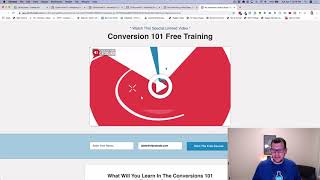
A short YouTube demo by Jaime Smith showing a Vimeo add-on (provisionally named “Vimeo Autoplay, Unmute, Restart” add-on) that autoplays videos muted and displays an overlay with a play/unmute control. When the user clicks the overlay the add-on unmutes and restarts the video at the beginning so viewers don’t miss the opening audio ‘hook’. The video explains browser autoplay restrictions and the UX benefit of restarting on unmute.
Chapters
Foreign. Smith. In this video, I want to do a quick demonstration of an add on I'm calling the Vimeo Autoplay, Unmute, Restart, Add on. We'll come up with a better name for it, but that's what it is for now. Right now, the Vimeo Autoplay, Unmute, Restart, Add on. Because that's what it does. It autoplays or allows your videos to autoplay muted and then gives you a little overlay, as we can see here, that has a play button and a click to turn on sound. And when you click that, it unmutes and it restarts the video at the beginning. So let's do a quick demonstration of what this is. So if we reload this page, we'll see that we get a little overlay here. And in the background we'll see the video start to play. But there's no sound, so we don't hear anything. And this is what allows it to work in browsers because today browsers will automatically either. If you've got your sound turned on for a video and you want to autoplay it, it will automatically stop the video. It won't videos with sound to play. So with clickfunnels, when you click set the video to be autoplay, it will mute the video. And so the problem is when you click the unmute, sometimes the sound doesn't come back on. And we kind of want this overlay. The problem is if you let the video just play. As you can see, this is attracting people. We've got motion going on. It's attracting people. But what happens if in most places is when you click the unmute, it just starts playing where it's at. It just turns the sound on where it's at in the video. But with the unmute and restart feature, it actually will restart the video back at the beginning. So now if I click play on this, have you ever asked yourself, back to the video, where's my money going? So you're probably. Well, they say you only live once right at the beginning of the video. Now from here we can play, we can pause, we can do all that other stuff. But the video was playing in the background. So we see the motion, we can see captions. It's always good to have captions on your video. We'd see captions go and capture people's attention. And then when they click to play it, it's going to start it back at the beginning. The reason for that is we don't want people to lose that beginning piece because that's usually where we're trying to hook them the best to get them to watch the rest of the video. So if they're watching with the sound turned off for the first 10 or 15 seconds where we've gone and done that hook, and then, okay, so they've seen the caption, they got the hook, and then they press the play and it just continues there from there. With sound, they don't catch the beginning. So we want the video to start back at the beginning so. So they can watch from the beginning and capture all the sound along the way. So that's what this add on does. I hope you like it and I hope you put it to good use.