Whats Add-ons Work in CF 2.0 from CF Pro Tools?
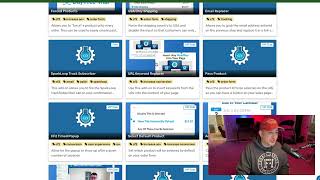
A short YouTube walkthrough (by Matt, Director of Customer Success at CF Pro Tools) showing that many CF Pro Tools add-ons already work with ClickFunnels 2.0. He explains how to filter the Add Ons list by the CF2 tag, then demonstrates and briefly describes ~33 add-ons (out of 106) that provide functionality such as content toggles, typed headlines, checkout/customization helpers, member-navigation, timed popups, video autoplay/unmute, product passing/swapping, tracking, translation, and more. He closes by encouraging users to try them and contact support for help.
Chapters
Hey, what's going on, guys? It's Matt with CF Pro Tools Director of Customer Success. I just wanted to take a minute to wish you guys a happy new Year and just to stop in and let you know what add ons we have that are working for click funnels 2.0. So it's a little bit of a misnomer that our add ons don't work with 2.0, but we actually have like 30 plus add ons that you guys can use inside of CF 2.0. And I'm gonna go in there and try and give you guys a rundown real quick on which ones they are, what you guys can expect for functionality, how you guys can use those real quick. I want you guys to get the most out of CF Pro Tools and I want you guys to get the most out of your account with Click Funnels, whether it's ClickFunnels Classic or ClickFunnels 2.0. So let's take a quick look. What do you guys think? Let's go. So I'm in my account here, but if you go into your account and you want to know what add ons are available to you, which ones work inside of Your account for 2.0, you can always go to the Add Ons tab, go to all add ons like this and then do a quick filter by tag. Make sure you're selecting CF2. Okay. If you find something that works and we didn't note it or tag it, let me know. We'll make sure to get it tagged appropriately. But I think we're pretty well caught up on these ones. We are at 33 add ons out of 106 add ons. Guys. Man, we have truckload of add ons that you guys can use to make your experience with Click Funnels that much better. So let's look here real quick so you guys can see what's available. We got Content Toggler, which was made kind of famous ish with the Traffic Secrets funnel launch. Let's take a quick look at that. So if I go to traffic secrets.com you guys can actually see if I come in here, toggle the two step over here. Um, there's actually like this more tag here that you can click when you're doing this and it'll actually bring this up. So bring up more content. You could use this with buttons. You can use this with text. This should work with CF 2.0. It might just be with buttons. Try it out with text. Let us know how it goes. Let us Know how you guys are using that? That's a pretty good one. Let's go back to. Back to CF Pro Tools. Let's take a quick look. We have countries to include typed headline. So if you guys are curious about typed headline, that's the one where it kind of types a headline out and then it'll actually reverse and go forward backwards, forward, backwards. So it'll actually remove the headline and then type a whole new headline, which is really cool. It gives it a really nice effect that allows those users to stick and they'll stay with you on the page a little bit longer. Okay. Magic Mover allows you to move stuff inside of the checkout element, just like it did with Classic, only with Magic Mover. So I'm sorry, with the checkout element in 2.0, there's not a lot of stuff that you can generally you can't customize a ton with the checkout element, except for what they're giving you for customization options. So if you want to add like a new input field, you have to use Magic Mover to do that. Right? So there's that member nav 2.0. This gives you guys, allows you to have next lessons and previous lesson buttons. And in your 2.0 course, really big thing. We really enjoyed that inside of Classic. So we've made that available to you in 2.0. Product minimum quantity. You guys might like that one working with Cart mode. It makes it so that you. You have to have a minimum quantity for products being selected when you have the quantity option. Selected Forced products. They're us only. Shipping Email replacer allows you to grab the email address entered on the previous step and replace it in a link on the following page. That one's cool. Spark Loop Track Subscriber. I haven't played around with that much, but if you guys play around with Spark Loop, give it a shot. Let us know how your experience goes there. Little things like this that most people don't even know exist inside of CF Pro Tools, but it's here. URL Keyword replacer. So you can add like words or something through the actual URL. So you could add them like in ads and. And then have them replaced. Those words would be replaced on the page or somewhere else. It could be an email, it could be a location, it could be anything. Right? Um, so however you want to use that, you can get creative with it and make really good use of the URL. Keyword replacer. Past product allows you to pass a product ID from the main page or when I Say the main page, like your sales page. Um, if you have multiple products, that way you can pass that ID along to your actual checkout page. So whatever they select you gets selected on the order page. That way they don't select something on the sales page and then go, hey, why isn't that selected when they get to their order page? It's already pre selected. So you can get pretty cool stuff with that. I like using it with Classic. I'm sure you can get really good results with that with CF2 timed pop up allowing you to basically give you a pop up that pops up after a certain amount of time. I don't think that that's built into the actual settings inside of CF2. So we made that select Default Product. So if you have like five products but you want to select a product somewhere in the middle, you can do that with select Default Product, Add to Calendar members area, Collapse other sections. So we have another members area app add on there. So that way if you have a whole bunch of stuff in the navigational element, you can actually drop it down. When somebody clicks on something, it'll actually collapse all the other sections. That way you don't end up with a really busy looking nav bar. Multiple otos. One of our newer ones here, this is something that allows you to have that one click upsell that you've been looking for inside of 2.0 inside of 2.0. So it's like click funnels 1.0. It's like CF classic for that, that upsell experience that you came to know and love on Classic. And I really love the way that this one works here. So we got that one. Survey is simple. If you want people to go through a survey and just click a button and it just progresses the survey. Instead of taking that second click to submit out of the mix. Use Survey Simple Bump Content 2.0 International Product Swapper Hover pair allows you to hover over an image. When you hover over the image, it swaps the product, swaps the image out with something else. That one's kind of cool. Gives an interactive kind of sticky feeling there. To the, to the page. The cookie Timed popper allows people to come to your page and then something will pop up at a certain amount of time and if they come back later, it'll actually already be up on the page. So they don't have to wait like 20 minutes for an element to pop up on the page again if they return to the page. Right. That works good as long as they don't. You Know what's that word? Clear the cache. Oh yeah, I remember that. So Vimeo Autoplay, Unmute, Restart. Everybody loves this one. Probably one of our most used add ons that has the. The. The play button and the click to unmute on there. This is great. Gives a great effect. I've been to a lot of pages that for, for people who should be using this, I really think that this is. Should be used more often. And YT which is YouTube autoplay unmute does the same thing. Gives you the play button with the Unmute gives your. Gives your page a clean play button there and then when you hit the button it restarts the video. Very cool. Date Replace Pro allows you to add in dates dynamically to the page. It'll add the current date is what it does. Slick Slider gives you scrolling images or elements that you can use on the page. Location Swap gives you dynamic locations. Single Country Shipping Facebook Fire Event Select Product on Click. There's so much stuff you guys can use still. Guys, come check this out. Go into your account and see what's available and, and play around. Get creative. There's a lot of different things that you guys should be able to do with click funnels 2.0. So I want you guys to know that this stuff is there, it is available and it's going to give you guys so much more that you guys can use Click Funnels CF Pro Tools together for. Right. So that. That Funnel Total Tracker and yeah I think that one's the one that we're looking for. Funnel Total Tracker is giving. It's collecting everything that the customer bought and then it's tallying it all up and creating a single value to send over to Facebook Ads. So you got. So it doesn't just send over like a single price after they bought something else. That way you don't get erroneous numbers sent over to the Facebook ads system, which is good. And that'll give you more accurate ad tracking over at Facebook. Right? Or yeah, sorry, yeah, Facebook. So there's that Translate will translate whatever you want on the page to something else. If it's something that you can't edit inside of. Click Funnels itself and then promo code 2.0. This one might be a little bit. You may not need to use this one as much anymore because they've kind of added the promo system into the 2.0 program. So. But lots of stuff here guys. If you like this better than what's already there or if you like something that's in here so much that you guys can do in 2.0. Go. Make good use of this stuff. Let me know what you guys end up doing. And if you need help, hit me up. All right? I'll be there in the support desk. All right, see you.










