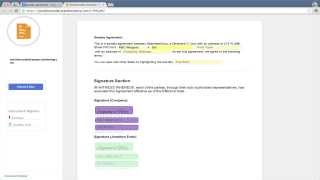
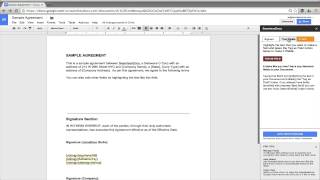
Jonathon Ende shows how to turn a Google Doc into a fillable agreement using SeamlessDocs. Create text fields by bracketing text or using the menu, assign signers, set passwords and hints, then generate a signing link. Recipients type or draw signatures, and the completed doc automatically goes to everyone.
Chapters
Welcome to Siemens Docs. Adding text fields and signatures to any Google Doc is easy using the Siemens Docs Google Docs add-on. Here we have a sample agreement between Siemens Docs and a company. You can see we've added brackets around certain fields. When you add brackets around any text field, we are able to automatically detect it as a fillable text field. In addition, you can also tag any text as a text field by under the menu going into Tagged Text Field. All of our fields can also be added additional settings, including the ability to assign it to a particular signer, adding a hint bubble, adding an additional password, or making it required. When you're ready to add signatures, simply under the menu click Add and Manage Signers. In this situation, we're adding between a company and a known signer. This will allow the company to easily exchange this URL and send it to the appropriate person. This comes in handy when you're not sure who needs to sign the document. You will notice that for your convenience, we automatically add a signature section. Keep in mind that you can feel free to adjust any of the language, but just don't touch any of the code that we've injected into your document. Now we're ready to sign the document. Simply click Finish and E-Sign. Here we are automatically generating a URL. This link can easily be shared. You can actually copy it directly from your browser and exchange it. You will notice that the fields are absolutely dynamic, meaning depending on the length of the field, it will adjust. Watch as the document adjusts accordingly. When ready to sign, simply double-click. They will be able to enter their name and sign by either typing drawing, or uploading their own from their computer. After they sign, it will automatically be sent to the company to finish the signature. From there, all parties on the document will automatically receive the final version of the document. If you have any questions or requests, please don't hesitate to reach out to info@ at SeamlessDocs.com. We look forward to making your life more seamless.