This is a YouTube video titled "ClearPoint Project Management" created in August 2019. It features a single speaker named Jenna who provides a tutorial on using ClearPoint's project planning and management tools, including dashboards, GANTT charts, initiatives, and milestones. The content is instructional and focused on helping users get started with project management in ClearPoint.
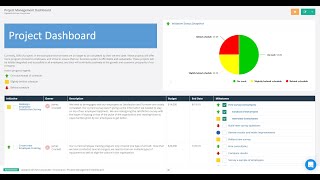
Hey it's Jenna. Ready to take your project planning and management to the next level. I'll show you some of our reports and walk you through adding your first project to help you get started. First I'll go up to Scorecards and I will show you our project management dashboard. We can see on our dashboard how many projects are on track or behind schedule as well as our most important initiatives and some of the key details about them. I'll just click on one of my initiatives to drill down to its detail page. We can see here our initiative has a GANTT chart with all of its milestones and the status of kind of each stage of the project. So if I want to add a new initiative I'll just go to Initiatives, Manage Initiatives. I'll click on Add and I'll say Implement clearpoint. Go ahead and save our initiative. I'll click on the name of our initiative to go to its detail page. I can double click in any field to adjust the start date or the end date maybe and save that. I can also add milestones by double clicking in the Milestones field clicking Add. We'll do schedule training from here. I can assign an owner to my milestone. I can also set an end date for my milestone, change the start date, save it here and we will see it appear on our detail page as well as in our GANTT chart. And if I want to make adjustments right from our Gantt chart, I can double click on any of my milestones, change the percent complete, change the dates here, set the status and save and it'll adjust right on my Gantt chart there. Go ahead and jump in to start adding your own projects. Watch our other videos to learn about goals, KPIs or creating reports. Or reach out to our team to schedule a personalized demo. Thanks for trying clearpoint.