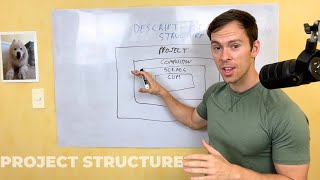
Learn how Descript organizes your work: projects hold compositions, compositions contain scenes, and scenes break down into clips. Understanding this hierarchy makes it easier to structure and find your media.
Understanding the Descript project structure is something I see a lot of beginning Descript users struggle with. So this is my attempt to create a visual of how the project structure works and kind of help you understand how projects vs compositions vs scenes vs clips break down so you can get familiar with the vocabulary. So when you first create a new project, when you're in your workspace view, there's that big blue button in the top right that says plus new. The first two options are Audio project or Video project. So the project is the biggest container in descript, the biggest container that you can work inside of. So we have a project. And when you create a project, by default there's one composition inside of it. So a project has one or more compositions. But when you create a brand new project, it's just one composition until you click a button that says Enable Multiple Compositions. Once you do that, you can have multiple compositions inside of one project composition. And whatever stuff you put into the media bin inside of a project will get shared amongst all of the compositions inside of that project. And sorry, I'm kind of standing in front of my beautiful art here. So project is the biggest container. That's what you create when you create a new project. Just like it sounds like, project has at least one composition. If you click Enable Multiple Compositions, then it'll have as many compositions as you want. And you can do different things with different compositions. A composition, one composition could be in landscape mode, one composition could be vertical or portrait. The composition could be a shorter clip of what's in your project or in in another composition rather. So a lot of the different things that you can do with compositions to give you a more sandbox, video or audio that you want to have as a separate exported product, then another composition. Now inside of a composition you have scenes. Scenes are created with a forward slash. Every time you add a forward slash to your transcript or your timeline, it creates a new scene. And once again, when you start a new composition, by default it's just one scene until you start splitting it up down into those finer scenes. And what you do to one scene, if you apply a layout like a certain level of zoom or a certain level of opacity, things like that, it'll only apply to the scene that you have selected. So it's, it's another way of sandboxing further inside of a composition and then inside of a scene, even you can have clips. And clips are just every time that you split your timeline. So you have a layer, let's say it's a video layer, and you've made cuts on it. If you click a portion that's been cut, you're only going to have selected that portion that's been cut from the rest of the layer. And if you make a change to it like you do, you affect the property, the layout property, or you apply an animation, it's only going to affect to that clip that you have selected. Hopefully this makes sense. Hopefully this helps to make projects versus Compositions versus Scenes a little more clear. I'm going to refine this and try to come up with a better visual. This is my very sloppy drawing, but hopefully it at least kind of makes sense what these different things are and kind of clears up project versus Composition versus Scene.