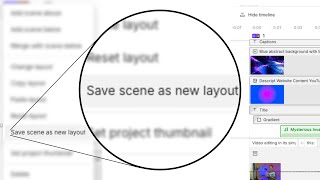
A short tutorial showing how to save and organize scene layouts in Descript so they can be reused across projects. The narrator walks through right-clicking a scene, choosing “save scene as new layout,” naming it, adding it to or creating a layout pack, setting share settings (private/drive/public), tagging a scene type, and confirming the save.
On your screen right now is a layout I made where there is a captions element, a background, and my camera is over on the right side. So because it's a layout, I can apply this in any video in any project, and I only had to make it once. So here's how you save it. In your own project, you come into the scene that you want to save as a layout. So in this case, this is scene number one. So I find scene number one on the left side, right click on it. Come down to where it says save scene as new layout. Left click on that. And over here on the right side, this is where you're going to name it. So I'm going to call this Captions Layout. Something descriptive like that, where if you're scrolling through a bunch of layouts, you'll be able to find the one that you want to use and then add to this is going to be the layout pack that you put it in. This one's already in my descript Mastery Layout Pack. But if I click on that and I'm creating one for the very first time, I can come down to the bottom here where it says Create new Layout Pack. Click on that and give your layout pack a name. I'll call this YouTube layouts. And here under Share Settings, you can make it private, meaning only you can see it share with Drive, meaning you plus any editors that are in your drive can see or share publicly, where you can get a link and share it with the whole world. I'm going to leave this on private and I'm going to hit Create. So now my Captions layout is getting added to my YouTube layouts pack that I just created under Scene Type. This is the last thing we're going to set. These are just for your own tagging system and organization. You could consider this a camera layout, or you could consider it a Captions layout. Since it has captions, I'm going to call it a Captions Layout. And whichever one you pick, these are just how the layouts inside of that pack are going to get grouped and. And then click Add. This notification is going to come up that says Adding Layout to Layout Pack and that's it. Once it's saved, you can now use that layout in any project, in any video forever. But this does you no good if you don't know how to make the layout in the first place. So check out this video next to learn how to make a scene that you can turn into a layout.