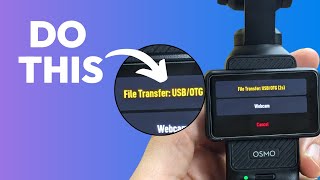
Connect your Osmo Pocket 3 to a computer with USB-C and tap the file transfer button within 2 seconds before it switches to webcam mode. The camera then shows up as an external drive where you can copy files directly.
To get files off of an Osmo Pocket 3 directly to your computer. Plug a USB C cable into your computer. Plug the other end into your OSMO pocket 3. As soon as you do so, there will be a little green light. When you flip the screen, there's a file transfer button at the top. Press it quickly, because within two seconds it'll automatically go to the webcam. As soon as you click on that file transfer button, the drive will open up on your computer, and from there you can browse it just like any other external hard drive. If you like this video, be sure to check out this one next.