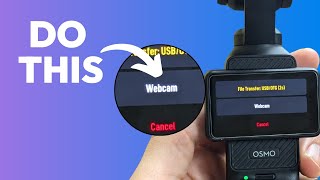
Connect your DJI Osmo Pocket 3 to a computer via USB-C and choose webcam mode on the touchscreen. You get 1080p at 25 or 50 fps built in, or 4K through third-party software. Then select it as your camera in apps like Descript.

Questions this video answers

USB‑C cable.

A little green light when connected.

“file transfer” and “webcam” (the speaker notes the webcam option appears in yellow).

1080p at 25 frames per second and 1080p at 50 frames per second.

No — the speaker says 4K output as a webcam requires third‑party software.

More from Ross

57:09
youtube.com

Getting Started With Descript Webinar

3w ago
1:42:38
youtube.com

Youtube and Podcast Creators Meetup

1mo ago
1:02:48
youtube.com

Slow Descript Tutorial for Beginners (2026)

1mo ago
3:25
youtube.com

How to make music fill your whole video

1mo ago
4:27
youtube.com

Why Descript's AI tools give you bad results (and what to do instead)

1mo ago
2:48
youtube.com

Why your Descript layout worked once, then breaks

1mo ago
58:36
youtube.com

Getting Started with Descript webinar | August 2026

1mo ago
25:07
youtube.com

ChatGPT Can Edit Your Descript Videos for You

1mo ago
4:06
youtube.com

Which Macbook should you get for Descript

2mo ago
6:32
youtube.com

Why You Should Assume Every Viewer Is New (The 60/40 Rule)

2mo ago
52:44
youtube.com

Getting Started with Descript - July Webinar recording

2mo ago
See all content