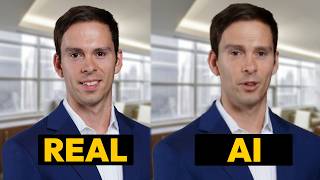
Ross Zeiger tests Descript's new AI avatar feature, which lets you create a digital clone from photos and an AI voice. He walks through the setup process and shows how the beta version works for generating video avatars.
Hello, my name is Ross. I'm like Ross, but like you know the AI version. So I'm different. That's a brand new feature from Descript. It allows you to create an AI avatar of yourself or of someone else using just a picture. To do it inside of a blank project, click on Create with AI speaker and then you first have to choose a stock voice. You can later change this to your own voice, but let's just pick Alex for now. Click choose speaker and then they have a gallery of photos that you can use. So you could pick any of these artsy animated looking ones. Or over here on the right side you can drag and drop in your own photo. So here's the photo that I used the video you saw at the beginning. And so there's our photo that's going to get turned into the AI avatar. I'll say assign avatar and now I can start typing in here. Hello, my name is Ross, AKA the Descript Master. I'm a digital clone of the human ros. And then I can go to where it says Alex and I could choose my own AI voice. And you can see there's the one I already assigned with the NT usb and it's already got my avatar assigned if I choose a different mic. So I switched it from Alex to another AI speaker that I've trained my voice on and so it'll be under this list. Add AI speaker to project and you'll need to find your own voice there and then select it. And then at the very top when you click on your name, say Assign avatar to. Then this is where you can upload your your photo again. And now I'm going to be assigned with that voice. I'll hit Done Writing and I've had a problem with where it's. It doesn't start loading, it doesn't allow me to click Done writing. So what I need to do is go back to home and then open it up again and this time it'll let me click it. So it'll say this little pop up here. I'll say Generate Avatar. It tells me it's going to use 5 seconds of my AI time for the month and I'll hit Generate. I get this window and keep in mind all of this is in beta. This is like V01. So this is all going to change over time. It's all going to work a lot better. But when you're watching this on April 26, 2025, this is how it looks generated 100%. Your avatars are ready. Continue. Let's go back to the start. Let's see how this works. Hello, my name is Ross, AKA the Descript Master. I'm a digital clone of the human ros? So it changes my face quite a bit, but again, this is version 0.1. This is just the start, and within a couple years, it's going to probably be indistinguishable from the human version. So go check it out in your Descript, play around with it and have some fun.