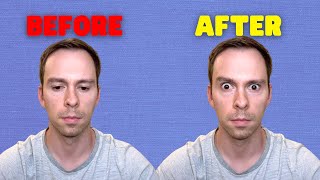
Descript's new AI eye contact feature automatically adjusts your gaze toward the camera during video. The beta effect processes in the cloud in about two minutes and noticeably changes how engaged you look on screen.
This new eye contact feature from descript uses artificial intelligence to make it look like you're always looking directly at the camera. Let's see how well it works if you're new to Descript. Descript is an AI video editing software. It has features like auto transcribing, auto captioning and automatic filler word removal. It is the best video editing software for podcasts and talking head videos on the market. On July 10, descript announced its newest version, the Eye Contact feature, which is included in the Release of version 68. This is from their changelog on their website and you can see here the eye contact and it is in beta, so at the moment it is available to all users. It says this new AI video effect keeps your gaze locked onto the camera no matter where you're looking, whether it's at your script, screen or slides. While in beta, this effect processes slowly and requires more time to complete for longer and higher quality files. This will be rolling out to everyone over the coming days, and once you get access, you will be able to find it under Effects Eye Contact in your Video Layers Properties panel. And this came out on July 10th, so almost two weeks ago now. And at this point everyone does in fact have access, whether you're a free user or a pro tier user. So without further ado, let's see how this actually looks in the software. So here is something I've been working on for the descript Mastery course. So over here on our videos layer, properties, you have to have the video selected. You can see this purple frame around the outside of my video, so that that tells me I have it selected. You'll come down to the Effects header, hit this plus button and we get this pop up with all of our normal features, plus at the end here the eye contact feature, and it tells us on the right that it's in beta. Says beta feature may take a while to process. Now, I've already loaded this onto this video previously, so it's going to load instantaneously. But the first time I added this to this video, it took about two minutes to add. So with all of these AI features, descript processes it on the cloud on their back end, so you have to have an Internet connection to use it and it does take a little while to apply. So let's go ahead and apply it. Eye contact and look at that. If you're paying attention to how it looked before, it is now different. My eyes are staring directly at the screen. Let me take it off again and let's play it without the Eye contact first. So here we go. This is without eye contact applied. There we go. So that is fading in and out. And if we want to do a crossfade, I'm going to reset these so you can see my eyes are looking down. I'm clearly looking at the screen below my webcam. I'm off center with my gaze. Let's go ahead and toggle the eye contact back on and hit play and watch. Pay attention to my eyes. There's no fade. Okay? So now that I've reset the scene to get rid of the fade, I want to show you a crossfade. And you see my eyes are locked directly onto the camera. And it's. It's much more engaging than before. It's as if you're talking to somebody and they're looking at their phone and they're not. You know, you can tell they're not really paying attention to you versus when they're looking straight at you and they're interested in what you're saying. So it's. It's a much more engaging effect. So let's play it one more time. And I'm going to toggle between on and off, and you can see how well this feature works. Here we go. To make this bigger so you can see my icon, my face in the bottom. And I'm going to make a new on. So right here on. Shit. So pretty cool, right? I love it. I find this stuff so fun and so exciting. And Descript is just always. Every month, they have a major new release with features like this. I love this software. If you're new to it and you need any help learning it, I have a tutoring offer and a course available. Both are linked below. And for the rest of this month, for the rest of July 2023, which is only about another week, the course is free. As it's in development, I'm still filming it. It's about 60% done, so click below to access it. And all I ask, if you get early access, is for your feedback. What do you like about it? What's missing? What do you dislike? What could be clearer? What could be expanded upon? Descript is easy, but there's a bit of a learning curve to it. So that's why I created this course. That's why I'm creating these videos and this channel. All right, Happy editing.