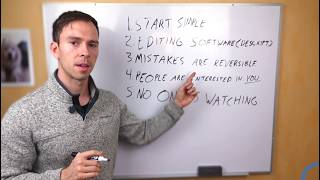
A creator over 60 walks through starting a YouTube channel from scratch. Use your phone, try Descript for editing, don't worry about mistakes, tell your story instead of chasing trends, and accept that early views will be low so you can improve.
You've had a full career and a lifetime of wisdom that you want to share on YouTube. You see all these young dumb kids building businesses on YouTube. And if they can do it, you can do it. You have the stories and knowledge that people want to hear. I'm not in my 60s, but more than 80% of the people that I've helped get started on YouTube are. I've even had a few clients in their 80s. Believe it or not, I'm making this video because there's challenges you have that I don't. You come from the era of amber screen computers and physical film. I've had clients tell me about the days of splicing film and just hoping for the best, but trust me, it's nothing like that anymore. I'm a digital native. My very first computer had video editing software built in, and video editing was a class that I could take in high school. I posted my first YouTube video when I was 15 years old. I'm 32 now, so I barely remember a world without YouTube. Now, I'm not saying that to make this sound impossible for you. It's not. I've helped dozens of clients in their 60s launch YouTube channels. But you come from a different starting point. So where should you start? Right here, right now, as simply as possible. That's my first step for you. So start simple. Use the phone you have in your pocket and the computer you have on your desk. That's it. Master those first. People have grown channels to hundreds of thousands of subscribers with nothing more than that down the road, when you're ready, you can start investing in better equipment. And by that time, you'll have a basic understanding of how to use a camera and you'll know your way around an editing software. Speaking of editing software, my second tip for you. I recommend something simple and beginner friendly like descript, which is what I teach here. Descript makes it so that you can edit your videos like a word document. It transcribes all of your spoken word into text so you can highlight sentences, delete things. You can even add things using an AI version of your voice if you want. It makes the whole editing process super easy, and most importantly, it makes it familiar if you already know how to use a word processor. My third tip for you. Mistakes are reversible. One of the biggest fears of my students who started using computers back in the 70s or 80s is that they'll mess something up. They'll accidentally delete something or click the wrong button and the whole project will be unfixable. Let me relieve you of that fear right now. With modern editing software, you can always hit undo to undo your previous commands, or you can use a tool called the version history, where you can see how your project looked at different points in time and you can restore back to that moment, undoing all of your mistakes. So if you're working on a project and you feel like you've been messing everything up for an entire morning, you can simply open up your version history and go back to how your project looked before you started messing things up. And the point being is, you don't have to fear mistakes in the editing process. Nothing is permanent. Tip number four, People are interested in you. A lot of clients worry that they aren't trendy enough, that they won't be able to get attention because they don't know all the latest music and editing styles and fancy animations. Let me ask you something. Have you noticed any over the top editing or fancy styles on this video? No, you haven't. And yet I've held your attention for this long. Simple editing and simple videos are great. Some of the most viewed videos in the world are people sitting at their desk talking into their webcam with zero editing, zero production value whatsoever. People are interested in you and your story. You don't have to impress people or be writing the latest trends to hold people's attention. Tip number five, and this sounds like a contradiction to what I just said, but no one's watching anyway, huh? What's the point of everything else? I just told you then. You've been around longer than I, so you know this. But it's always worth a reminder. There's something called the spotlight effect. The spotlight effect is the feeling that everyone is watching us. Everyone is focused on me, me, me that they see all of our flaws and they're laughing at us like this guy is an idiot. The reality is everyone is only focused on themselves. So I'd encourage you go into this adventure expecting that your first 10 videos will get less than 100 views. Because they probably will. So use that time when no one is watching to get better. Get better at speaking on camera, get better at writing your scripts, get better at editing, and by the time you start to get good, that's when people will start to pay attention. If you want my help with starting on YouTube, click this link right here on my whiteboard and you can learn more about working with me.