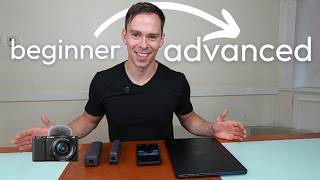
Start with your MacBook webcam or phone, then graduate to a DJI Pocket gimbal or Sony ZV-E10 II if you want better control. Each step trades convenience for quality, and each needs different gear like tripods or SD cards.
Questions this video answers
1080p
Since 2021
Around $250–$300 (speaker: 'less than 300 to $250')
Recorded as 'came out like a month and a half ago' (relative to recording)
Choosing the right camera to create great videos for YouTube is overwhelming. I get it. So I'm going to try to demystify that a little bit and I'm going to show you starting from the very simplest option all the way to the most complicated option, which I don't have here right now because I'm filming with it, which is an actual standalone camera. But I'm going to show you kind of a progression of complexity from the simplest thing to the most complicated thing. So the first thing I have here is my laptop. This is a MacBook Air. And I tell you that this is the simplest because you can start a software like descript, you can hit Record in descript and then this is going to be the default option is the built in webcam. Even a Windows computer, they all have built in WebCams now since 2021. Every MacBook has a 1080p camera built in, which is a really good, it's a good resolution camera. And I'm going to talk more in future videos about how to get the most out of it. And a lot of Windows nowadays, a lot of Surface laptops I think are shipping with 4K cameras. So and this is the simplest because you don't need anything else. It's built in, it's going to be the most reliable camera and it doesn't cost you a penny more than what you're already paying for the device that you're going to edit on. The next option is, is a smartphone. And I have, you can see something on my screen. I'm using this to control my camera right now. But the smartphone is a really amazing camera. All of, almost all smartphones nowadays have 4K cameras. Really, really good cameras. And you carry it around in your pocket at all times. So with this, the only thing you need is a simple tripod or a selfie stick or something like that and you can start recording yourself. And if you have a Mac and an iPhone, this is not an iPhone, but if you did, you could connect it using something called the continuity camera. And all of a sudden you have a really, really good 4K camera to record yourself straight into your laptop. The next thing I have here, this is called a DJI Pocket 2. And this is a really small handheld. It's a 4K camera. And this is actually the old model. So you can get these at Costco right now on sale and Amazon, I think they're, I don't know, I haven't checked, but I think they're less than 300 to $250 so that's a really good and really small camera. I say that is one step more complex because, well, everyone has a smartphone, everyone has a laptop, but not everyone wants to get another device. And so it's a little bit extra expense and it's one more thing to carry around. But as far as it goes, this is, is a do it all option. It's got the gimbal built in so it'll, it'll stabilize if you're on the move. You can take great shots from cars or walking, that kind of thing. And it's one more step complex because you have the SD card which you would have to plug into your computer to get the videos off of the device. But it's a great option. And then the newer version of that is the Pocket three. And this is quite a bit bigger, but it's also significantly more capable. This is an incredible device. I love this so much more. I would recommend save the extra few hundred dollars and get this one because it's just such a better quality camera. And if you can spring for the creator pack which includes this little kit here. And it's got a little tripod that you can mount this camera on. It's got a microphone so this syncs seamlessly with the camera. And you can just put this on your shirt. And this is an amazing camera, not only for in the studio, but for being out and about, like I said, walking around, because it has that built in gimbal so it keeps it nice and stable or anything on the move. And it comes in this little case that you can just slip into your pocket. Okay. And for this last one, I'm going to detach the camera I'm filming on right now because I need to show you it. Okay, so now on to what I consider the most complex camera setup, which would be to have an external camera. And this is called the Sony ZV E10 2. This just came out like a month and a half ago, so it's still very new to me. And this just has so many more options. It's much, it's still a beginner camera. This isn't by any means like a pro level camera, but compared to these other options, there's just so much more you can do in terms of the settings. It's got this little mount on top. So this is the camera I actually filmed the first part of it with. I have this little external microphone that was clipped to my shirt. And then this is the receiver and that just mounts to the camera and plugs in. And then you can change the lenses. So there's just way more customizability and things that you can do with this. It's just a. It's a really, really capable camera, but a step more complex and a whole lot more expensive. So I hope you found this useful. This is without going into the technical specifications and all that kind of stuff. That's just my general thoughts is like, this is going to be the thing you can open up right now, turn on, don't have to buy anything else or attach anything and you can start recording. Step up. Is this because when you take a video with it, you're going to have to connect to your computer or you're going to have to somehow get your photos and videos from here to here. And then same with these options, including this. This is the Pocket three that I'm on right now. So you can compare the video quality of this to this. And then the final tier is to get a really nice, much more expensive, but external camera. If you found this useful, be sure to subscribe to the channel because I have more videos planned on microphones, lighting and other gear that I use and recommend.