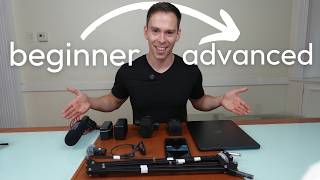
Start with your phone or AirPods, then move to a USB mic like the Rode NT USB Mini. The speaker walks through wireless lavaliers (DJI Mic, Hollyland Lark M2) and shotgun mics, covering what matters: proximity, sensitivity, battery life, and price.
Questions this video answers
2019.
About 8 gigabytes per transmitter.
About $100 (speaker said 'this one was $100').
About $200 (speaker said 'this one is $200').
About $150 (speaker said 'This one was $150').
When it comes to picking audio gear for YouTube videos, it's overwhelming. I get it. It's. There's so much. And all the YouTube videos you watch, I get into the really detailed technical specs of all the different mics and testing in different environments. I'm just going to give you some of the toys that I have here, show off some of my toys and give you thoughts on who it's for and what kind of videos you can make with them. So starting off with, I have my smartphone right here. I started a podcast in 2019 and when I did that, it was a travel podcast. I was going around the world. The only thing I used to make that podcast was my smartphone and the speaker or the microphone rather, that's right here. And so I would just talk into it like this. And I had a decent, it was decent, it's fine, it works. There was a lot of ambient sound. You could hear birds and you could hear different things based on the environment I was in. So it wasn't perfect, but it worked. And I didn't have to buy anything else. I didn't have to lug anything around. It was easy, it was free because I'd already paid for the smartphone. The next step above that would be to use headphones. These are shocks, these are like the bone conduction headphones. And these are not a perfect example because the microphones are actually not really good on these. But something like AirPods, which a lot of people have, those have amazing microphones and that's a step above this. If you have the AirPods Pro, I think they have noise cancellation and all that kind of stuff and you can get a really, really high quality sound out of that. The other thing you can do is the, your own laptop has a built in microphone. It's not going to be great. Your headphones will be better than the built in microphone in your laptop. But it's, it's there. So I don't recommend that because you're going to get a lot of ambient sound. Your voice is going to sound a little hollow, but it's an option. The next thing, after a couple of years of podcasting with just the smartphone, I moved on to this thing right here. This is called a Rode NT USB mini and this has a USB C port in the back. So it just goes USB C to straight into your cell phone. I record in my laptop, I record it into an iPad at various points. So it's a very versatile, it's pretty small. And if you're going to use a microphone like this, you're going to want to get a mic arm. And this mic arm I've also had for four years or so. And this was only like 15 bucks on Amazon, so you don't have to spend much on a mic arm. It would help to spend a little bit more. The reason I taped this up is because I would get a lot of reverb on these springs. And so I just tried to kind of dampen the metal surfaces by taping it up. More expensive ones will have springs where it'll cushion the any shocks. Like if you hit your desk, it'll kind of soften that impact. You can just mount this on a cheap mic arm. And then with. With these mics, you want to have them as close as possible to your mouth for the best sound. And most of the early videos on my channel are made with this microphone right here. I used it for about four years now. The problem with this, there's one important thing to know here. There's something called a condenser mic. That's what this is. And there's dynamic mics. Condenser mics pick up a lot more sound. They're a lot more sensitive. They'll pick up a lot more room, noise versus my new mic. The next one I'm going to show you is a dynamic mic where it more focuses on the sound directly in front of it. And that's a lot better for what most people are doing. If you don't have a soundproof room, you're not a musician, stuff like that. I'll go ahead and talk about this one. This one's the Rode Podmic usb. There's also a Rode Podmic without usb. And what I really like about this one is, like I said, it's a dynamic mic. So it's kind of a. It's a better version of this. And you can plug it in USB C to USB C or it also has an XLR port. XLR is the heavy duty thick cable that musicians and professional podcasters use. And so if I decide down the road that I want to upgrade, this thing can grow with me. I can get an audio interface, I can get the XLR cable, and I can get even more performance out of this. And this is just a really, really awesome mic. Both of these are really heavy duty. They're like built out of aluminum, I think. Very solid and very plug and play easy and Rode. The company has some software you can download that is audio processing software. So you can improve the sound of both of these mics before it even reaches Your audio software Descript or whatever you're using. And they're, they're not super expensive. This one was $100 and this one is $200. The podmic. So love these mics. The next thing I have is some wireless mics. I started with this right here. These are the DJI mics. One, the original mics, it's got a receiver that you could plug into a camera, into a smartphone, into pretty much any device. It's got USB C adapter, it's got lightning adapter, and it's got a cold shoe that you can mount into a DSLR camera. And then it's got the two receivers. So if you're doing an interview, you could give one to each person. And these can record on device. I think they have eight gigabytes worth of storage each. So several, several hours of, of audio. Or you can have it go directly into your camera and record like that. So this is an awesome device. And this is a charging port. So you just pop them in there. They got little magnets, they lock into place and then you can get tons and tons of time. I've never come close to running out on a shoot. I have the DJI Mic 2, which is the next generation of these ones. And this one is. I only have one instead of two. This one came with the Osmo Pocket 3. So these sync together and they, they pair really nicely. I can start a recording from there. And the range on these is crazy. I recently was doing a shoot and I walked like 100 meters away from the camera and it still picked it up great. So the range on these are awesome. Battery's awesome. They're just easy to use. This next one is very similar to the dji. It's got the case, it's got. It's magnetic and it feels a little bit lighter. It's a little bit more plastic, a little bit less heavy duty than the DJI. But this one's called the Hollyland Lark M2, I think it's called. And these are very cheap, by the way. This one was $150. These were like 300 when I bought them. The DJI Mic 2s are I think 300 to 350 for a set of two. And look at how small this is. I'm wearing it right now. So if you like the sound quality of this video, that's what you're hearing right now. And the receiver is not in here, but it's currently mounted to my camera receiving the audio coming from this mic. And so these are awesome. You just drop them in there and they can charge like that. And they have different. I have a black sticker over this because normally it has the logo on the mic itself, but it comes with a pack of stickers with, like, smiley faces and different colors and it's really fun and you can customize them however you want. But again, I just use the black one because I often wear black shirts and it just blends in. But it's so small. The problem with these DJI ones is they're a lot heavier and it'll pull your shirt down. But this one is like the size of a coin and it's. I forget it's even there. And the sound quality is great. I see big youtubers like mkbhd. I've seen him wearing this, so can't say enough good things about the Hollyland Lark M2. And then the last one I'm going to show you is. Is this is a Rode video mic. And honestly, I don't use this one often. I've only used it a few times. It's good for when you don't want to have any microphones, but with this thing, like I said, it's so subtle that I don't. I don't mind it. It doesn't bother me. And so I don't really need this. You could mount this to a cold shoe on a DSLR camera. It's got a little spring, so it kind of cushions any shock that might happen and it plugs in to your camera. The thing I don't like about it is you have to turn it on, which. Some of these are just so easy. Like these ones, they're. They're on as soon as you pull them out of the charger. But this one, you have to remember to turn it on every time. And, yeah, it's just not. Not something I find myself using as much. If you like this gear series, I did one about cameras yesterday. I'm going to do one about lighting tomorrow. And be sure to subscribe to the channel for more like this.