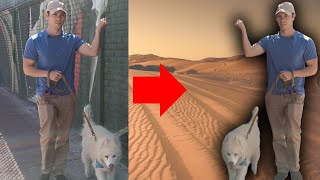
Short tutorial explaining how to use Descript’s AI-powered Green Screen effect to remove a video's background without a physical green screen. The speaker walks through selecting a layer, opening the Properties menu, adding the Green Screen effect (which processes automatically), and then replacing the removed background with an image or stock B-roll.
Today you're going to learn how to go from this to this. The feature you're going to learn today is called Green Screen. Back in the prehistoric days, about five years ago, you had to have an actual screen behind you that was green, called a green screen. Now, AI makes it so you don't need that. Here's how to do it inside your project. Find the layer where you want to remove the background and click on it. With the layer selected, go to your Properties menu. This one right here on the right. If you don't see it, you'll need to toggle this on right here. That's your Properties menu. Scroll down until you see effects. There it is. Click the plus button and I've already selected it. But if you haven't before, you'll need to select the one that says Green Screen at the bottom and you'll see this. Toggle it on. And if this is your first time applying it, you'll see a notification right there telling you that Green screen is processing. And it'll take anywhere from a few seconds up to a few minutes, depending on the length of your video. I've already applied it, so it happened instantly, but that's it. Our background is gone. There are no settings with Green Screen. The only thing you can do is toggle it on and off or remove it altogether by clicking that Remove Effect setting. So how cool is that? No actual green screen required. And once your background is gone, let me apply it again. Once your background is gone, you could now apply any background you want. It could be an image, it could be something from your stock, stock media here that Descript provides. So I'm just going to go ahead and apply this B roll just to show you real quick. Send that to the back. And you could do anything you want with that. For example, now that my background is gone, I'm in Hawaii. Oh, wait, I'm on Mars. Hold on, I'm in Times Square.