How to Increase Your Organic Traffic with Google Search Console (Quick Win)
Eric Siu shows how to use Google Search Console to find pages getting lots of impressions but few clicks, then fix them by rewriting titles and meta descriptions. Test changes in a spreadsheet, track results, and hand off the work to your team.
Chapters
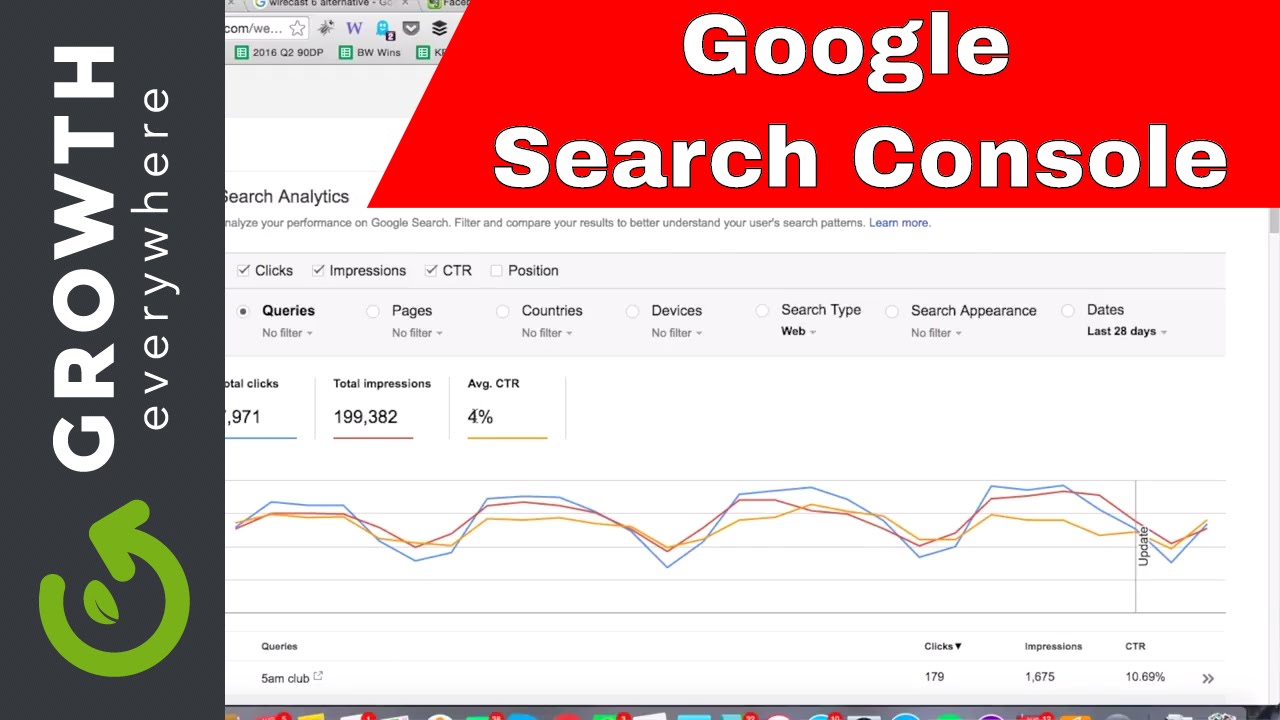
So today I'm gonna talk about how you can get a very quick and easy win to increase your organic traffic. So what we're gonna do right now is we're gonna hop into Google Search Console. And if you don't have Google Search Console, all you need to do, Google Google Search Console and download it, and then you can basically install it on your website. It's completely free, and it's gonna show you SEO metrics on your website. So what we're trying to do right now in this video is basically to look for posts that are underperforming that are already generating impressions in the search result pages. So that means Google is giving you credit, it's showing your page, but you're not getting clicks, you're not doing your end, you're not fulfilling your end of the bargain in terms of driving people to your website. You're not making the title enticing enough, you're not making the description enticing enough to come to your site. So what we're gonna do right now is looking at Google Search Console over here, we're gonna go ahead and click on the search analytics link over here inside of the dashboard. So this is one of my sites right here, and once you click on that, you can see, okay, this is gonna show you how things are going on your website. It's showing your queries, the number of clicks you're getting per keyword. That's nice, but that's not what we're trying to get to right now. So what we're gonna do is let's go ahead and tick these checkmarks up here so you have clicks, impressions, and click-through rate. And then from there, you can see now, okay, now you can see the total clicks you're getting, the total impressions, and your average click-through rate for me right now is 4% in the search engine pages. So right now what I wanna do is I wanna look at the pages. The queries are nice, but I wanna look at the pages. So I'm gonna go ahead and click on the pages right here. And then when I look at the pages, I can see, okay, what's performing well, what isn't. Okay, this page, Creating a Successful Sales Team, has a 10.54% click-through rate, which is fantastic. So anything above, I think, 1% or so, I think you're doing okay. So we're looking for the ones that are severely underperforming. So what you need to do here is switch it from clicks and filter by impressions instead, from top to bottom. And now we're gonna look at the posts that are generating the most impressions. And we're gonna scroll down, and you can see, okay, we got 5% here, 10% here, 4.87%, 5.91%. This one right here, we got 0.82%. And this is our post on Backlinko, Brian Dean, build traffic SEO. Basically, it's a Brian Dean post. And he's good He's really good at SEO, by the way. You should check out his blog, Backlinko. So, this one right here we gotta take a look at. And the question is, like, why is this one underperforming? So let's go ahead and click on it, and let's see what the heck is going on for this specific page. So, right here, we can see the title. It says, GE EP61. Hold on, there's a popup coming. And it says, how Backlinko's Brian Dean built his traffic to 90,000 visits per month. So the question is, you, the question to you right now is, how would you go about improving this title? Think about it for a second. What looks unwieldy in this title right now? I'm gonna go ahead and highlight it. Right, it's this part right here, the GEF61. We don't need to see that crap. Like, most people don't know what that means. That might make people think it's like a scam or something like that when you see that in the title. So that's what you might wanna change initially. So you might say, okay, well, let's just change it to How Backlinko's Brian Dean Built His Traffic to 90,000 Visits Per Month. So let's just change it to that, and then, you know, you might make an experiment spreadsheet saying, okay, on this date we tried changing the title for this post posts, the original click-through rate was 0.82% when we first started. The hypothesis is that after a 30-day period of time, when we change the title, hopefully the click-through rate increases by 25%, right? And then you come back to it 30 days later, you look at your Google Search Console, and you can see in fact the click-through rate has in fact increased. You have to have a methodical approach to this. You can't just say, I'm gonna change a bunch of titles and not know what happens afterwards, okay? From here, you can look at that, but you also want to look at the meta description as well. So, right here, I'm just going to click view page source, and let's go ahead and click on description. Okay, description's right here actually. So, meta name, description, learn how Brian Dean from Backlinko used effective SEO to catapult his organic traffic. That's not a bad meta description. Let's go ahead and leave that. We just want to change the title. So, by doing this, hopefully you come back to it. Next month, let's say you're able to increase by 100%, then you're at 1.6% click-through rate. Well, guess what? Your traffic for that one has doubled to 50, okay? Or doubled to 100 clicks. And you're gonna get, you know, an extra 50 clicks per month, okay? And let's just say, you know, hypothetically you have to pay $10 per click. Well, you know, that's— once you start to do this, you're gonna start to stack on the free traffic that you're getting that you would originally pay for. So instead of, you know, paying, you know, whatever, let's just say it's $1,000. $1 per click, right? Well, basically you're getting $50 in free ad spend each month, which can add up to $600 per year. You know, you do the math from there. Look at the, look at the money pages for you, the pages that really matter, the ones that are really driving email signups, and try to optimize those. And you look at this one right here, David Allen from Getting Things Done. Well, look at this one, it's 0.31% click-through rate, and we're getting 12 clicks on 3,800 impressions. That's one to improve. We have one on YouTube ads, 3,300 impressions, 14 clicks, 0.42%. This one right here, 0.09%. So there's a lot to improve on. And what I would also recommend as well is exporting this and then color coding anything that is below a 1% click-through rate. That way you can go in there and make changes, and then you can even hand off this process to somebody else after you've figured out how to do it initially. But first few rounds, do it yourself, make sure you have the process buttoned down, then do a screencast like what I'm doing right now, and then you can send this to your team and then just continue to do this over time, right? Maybe each and every month you're running these experiments. You should be having an experiment spreadsheet not just for SEO but for overall conversion rate testing. So, you know, at a certain level, and this is for another conversation, when you have enough organic traffic, SEO and conversion rate optimization start to kind of meld together. So just keep that in mind down the road. So that's enough for this video, and make sure to join us in the next video.









