Step-by-step setup for John Deere 2630 display documentation, covering crop season, operator selection, machine serial number, implement offsets, and variety assignments for Green Star Click planning.
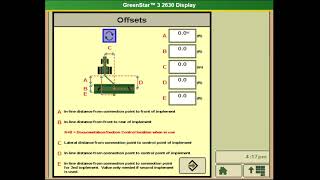
I'm here how to show you guys how to set up documentation on a John Deere 2630 display for planning Green Star Click documentation and it'll highlight four checkboxes. Accept make sure all boxes are filled in and correct. Turn documentation on to whatever you want to do, which is planning. In our case, change your crop season to the current crop year. You don't have to select an operator, but if you want to, you can. Once you select an operator, it will give you the option of a license number. Put your machine in there. If the serial number is already loaded with a setup file, click Next. Please measure these. Make sure they're correct. Sometimes they can be off. The serial number of your planter should auto populate. As long as you got a seed star planter. Here are your implement offsets. Please measure these. Make sure they're correct because if not it will show widen air middles and if you have station control it will not work correctly. Here's where you can change your widths. In this case we're 12 row 30. Make sure your physical width is correct. Here's where you can assign your varieties and seed types. In this case we're going to do Cotton variety setup is complete.