A technical walkthrough of the Interactive Combine Adjustment feature on John Deere S Series combines. Learn how to optimize machine settings for better harvesting performance and productivity.
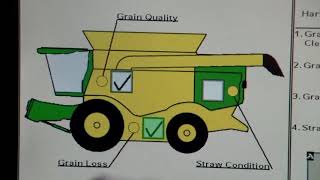
Performance, productivity, and exceptional harvest experience. Go Harvest get the most out of your S series Combine today Before beginning any procedure, follow safety instructions and understand all safety decals according to the operator manual. Always use seat belts when operating the machine or riding as an observer. If you are parking and leaving the machine, move the multifunction lever to the neutral position, disengage the harvesting unit and separator and shut off the machine. Apply parking brake, remove the key and lock the operator's cab. Interactive Combine Adjustment helps operators improve machine settings based on their harvesting requirements the Interactive Combine Adjustment or ICA will provide you with recommended machine setting changes to improve performance according to your harvest priorities. To access ica, first select H, the Combine Setup icon, then select I, the ICA icon. Select A the Combine Setup icon to begin prioritizing your harvest operation. To prioritize your harvest settings, select the text and use the arrow buttons to set the order of importance. Once you are finished, press the Accept icon and return to the ICA homepage. Select the areas on the combine that you would like to improve by checking the box for that area. It is recommended to choose one area at a time, but more than one area can be selected. Press the next icon to move forward. The Back button will take you to the previous screen to make additional changes. You can select the areas that require improvement by checking the box on the list. The question mark icon will give you a description of each subset. If more than one area is selected for improvement, an additional subset list will show up. The next icon will move you forward. ICA will then compile a list of machine setting recommendations. The next recommendation will be shown above the current recommendation. Press the Forward icon to scroll through the Machine setting recommendations. The back button will return you to the previous page and the Abort icon will exit ica. Press the Accept icon to select the current recommendation and the machine will automatically adjust the setting. Once selected, ICA will prompt adjustment being performed and a status symbol will appear at the bottom of the display. When the adjustment is complete, the ICA icon will flash in yellow. Select the icon to evaluate the change in performance. Press Next to evaluate the following areas of improvement. Then select the status of the issue from the drop down menu. The next icon will move you forward to determine if any new issues are present as a result of the most recent adjustment. Select one of the answers listed. Press Next to continue. If all previous issues are resolved and no new issues are reported, then the optimization is complete. If issues are not resolved, the previous steps can be repeated until the desired performance levels are reached if the system detects a change in machine performance such as high losses, the ICA icon becomes red. Select the ICA icon button to launch a new optimization. This video is intended to be a quick reference for interactive combine adjustment on the S Series combines. For further and more detailed instructions, please consult the operator's manual or contact your John Deere dealer.