This is a YouTube video titled "Smarta lösningar – AutoSetup" containing a discussion between two speakers, including Torsten and another unidentified speaker, about the features and benefits of the Auto Setup tool for agricultural operations. The conversation covers how the tool integrates planning and machine operation to reduce setup time and operator errors, recorded on June 2, 2023.
Let's talk about AutoSetup. Torsten. Auto Setup replaces the My Job solution. Is that correct?
Yes. As part of Auto Setup, we are introducing a new work planner tool in Operations Center Web and mobile version. This offers a new fully integrated planning experience where you can plan work in the operations center and send these directly to the machine in the field.
And what is the work that can be planned with the new tool?
All the four main operation types can be planned in the new tool.
So tillage, seeding, application and harvest.
Exactly. And while planning, the user just has a few steps. In the first one, he defines the work details like products and machines and operators to use. In the second, he selects the fields. And in the third step he he goes in the field specific details like prescriptions or guidance lines. And then just with a few clicks, he can send this information directly to a connected machine.
And how can the driver access the data?
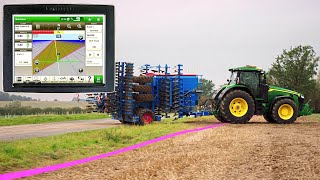
The setup file appears automatically on the Gen 4 display. When the tractor crosses a field boundary, the work plan automatically loads and work can start immediately.
That sounds like a lot of less work for the operator. I'm really deeply impressed.
It's really a great solution. Setup time in the field can be reduced by up to 90% and you face less operator errors. So basically you can plan your work from anywhere with any device. And all this is coming for free.
Even free of charge, out of setup. That is what I call a smart solution.