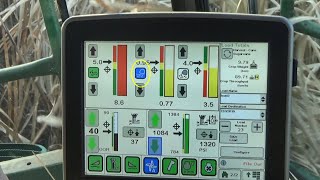
John Deere's SmartClean system uses sensors to automatically adjust fan speed on sugar cane harvesters, optimizing cleaning while reducing crop loss. The video explains the system's components and the status icons operators see in the cab.
Harvest monitor with SmartClean is a John Deere exclusive system that gives sugarcane producers the tools to make SmartClean uses sensors to detect billets leaving the cleaning chamber and automatically reduces fan speed to achieve a balance between effective cleaning while preventing billet loss. Key SmartClean components are the primary extractor fan with speed sensor, fan pressure sensor, cane loss sensor, harvest monitor, trash sensor, elevator speed sensor, and machine controllers. The controllers process inputs from the trash monitor and cane loss sensors and adjust fan speed according to system settings determined by the operator input on the greenstar display. The fan pressure sensor provides feedback corresponding to fan speed to help the controllers make accurate fan speed adjustments as conditions change throughout the field. With the electronically controlled SmartClean system, system status is communicated to the operator with three primary icons. These icons appear on the extractor fan setup screen when the SmartClean system is activated. The icons display the status of elevator trash, cane loss, and the field residue estimate. The status icons are displayed next to graph bars on the SmartClean run screenshot which relate to the three parameters which are monitored and ultimately control the SmartClean system. In addition to the three separate icons, a color coding system is used to convey operating condition and status to the operator. A logical progression of icon background color from gray to yellow, green and blue occurs as the machine has started and systems are enabled and activated. The outline of the icon and steady or flashing pattern further defines the status of the system in various stages of activity. A solid icon with a gray outline indicates that an option is disabled or is not installed in the system. A solid icon with a black outline indicates the option is installed but is turned off. A flashing yellow icon with a black outline indicates the function control is enabled but automatic operation is not enabled. A solid yellow icon with black outline indicates the function is enabled and ready for automatic operation. However, the primary extractor fan is not running and is preventing activation of the function. A flashing green icon with a black outline indicates the function control and automation is enabled. The extractor fan is engaged in working mode, however, no crop is detected in the elevator. A solid green icon with black outline indicates that crop is detected in the elevator. The closed loop of all sensing inputs becomes active when crop is present and the icon outline changes from black to white. A flashing blue icon with black outline indicates the function control and automation is enabled. The primary extractor fan is engaged in working mode and the function is controlling fan speed. However, no crop is detected. A solid blue icon with black outline indicates all necessary operating conditions are met and crop is detected. The closed loop of all sensing inputs becomes active and the function represented by the blue icon is.