Step-by-step guide to adding a live event calendar to your Kajabi site using Elfsight Apps. The tutorial walks you through creating the widget, customizing event details, and embedding the code so your members can see upcoming events.
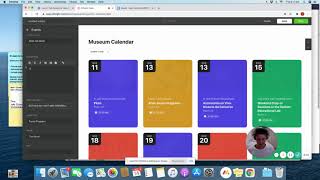
Empire Builders. Today I'm going to show you how to create the calendar widget for your Kajabi site. This is what we've got on Tina's site where we've got all of the upcoming events for Empire Builders. It's really handy because your clients can add it straight into their calendar. It syncs with their time zones and it also syncs with most calendar applications, which is really good. So what you first need to do is create yourself an Elfsight Apps account. We pay about $6 US a month for our just on a basic plan and depending on how much you use it, that will vary. Once you've created the account, you'll get to this page which is like your homepage or your dashboard. And if you scroll down, these are all the different types of widgets that you can create for your site. So you might have a bit of fun doing that. But for this one I'm going to show you how to do the event calendar. So just say create widget over the event calendar. Up pops this screen and on the left hand side are all the different themes that you can choose from depending on your personal preference. We chose Museum for Tina's site because it was nice and easy to customize. So you just click on that one and say continue with this template. Down the side are all the different types of events. If you want to add more, if you've got more, you can just click add or if you don't want some, you can just delete. Click on the top one to start editing the event. You can edit the name, you can edit when it starts, when it ends, if it repeats or not. Perhaps you've got a weekly event that is the same. The description I'll just type in here so that I can show you where the description is. When you click on the event, the photo or image that you want displayed. So we created all of our tiles in Canva and then uploaded them in here. But you can have pictures or images, whatever you want and they would just go here at the start. The event type, you can customize to whatever you have. So for example, in Empire Builders we have masterclass Expert Guest Experts, Kajabi with Matt Bonus Session. So I made all of these a different type of event. And the reason for this is that when your client comes onto your website, they might just want to know when all of the masterclasses are scheduled. They can click on here, click masterclass and it filters all of the events out, so that's why that one's there. So we keep editing all of these things you can add in the venue, you can add in the host, some tags if you like. And then for the event color, this is where it starts displayed. So we chose all of our branding colors. So you just pop your RGB code for your branding colors in there. Once you've edited all of the events that you need, you just click save and up pops the code that you need to put into your Kajabi site. The best thing about this is that it's a live calendar. So anytime an event changes or we add, say a bonus session in, I can come in here, add in the event, and it's going to automatically update on the kajabijab site, which is really handy. So then you just copy the code, head on over to your Kajabi site, and this is obviously our Empire Builder calendar page. What you need to do is you need to add in a custom code section. So just add content and head down the bottom. Add section. Sorry, head down the bottom. Click custom code. Then when you go into the custom code, this is where you paste the code from the elfsight website. Hit save and your calendar should be up and running. If you have any questions, just ask. But have fun customizing it and it's really great for your clients, so get it on your site asap. Thanks, Empire Builders. Speak to you soon.