A walkthrough of Promo, an online tool for making marketing videos for Instagram and Facebook. The speaker shows how to pick clips, add text and music, change colors and fonts, then download in formats for different platforms.
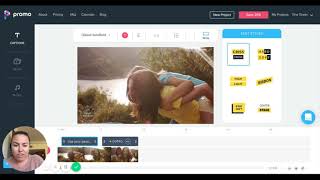
Hi, Happy New Year. I am here coming to you from Morocco. And today the tech tip that I want to show you is a online site called Promo. So what Promo does is it makes marketing videos for you very, very quickly, very, very easily that look nice and professional, that are really good to use. So I use these, you know, to go on Instagram or to go on Facebook to animate your posts so. So that they're attention grabbing and just something that little bit different as well. So to give you an example, so you've got all of these really short video clips here that you can choose from. You can look at videos for your industry. It would have been good to do Christmas videos at Christmas time. So you can keep that in mind for next Christmas. So we've got the launch of Laptop Life going on. So the background that I want for that is kind of like an aspirational sort of happy. Most of the people that do it are women. So I'm going to write in Happy mom and it's mom, because that is how you spell it in America. And then I go down. So it's got all of the different videos here and all I need to do is choose one that's appropriate for what the message that I'm trying to get across. And when you hover over them, it gives you a little bit of an example of that looks like now for that, you know, that'd be great for a baby commercial or a children's product or something like that. But I'm looking for something that's really, just really happy inducing. This looks great. Yes. So this lady looks happy, she looks free, and she's got all the time in the world to spend with her family. And that's the one that I want to use. So we'll go use and then let me show you how easy this is to hook up and get it working. So what we do. So we go, all right, okay, let me use my brain while I do this at the same time. So here we go. All right. Use your passion and expertise to get more freedom in your life. There's my first one. And then we can see what that looks like. Use your passion, expertise to get more freedom in your life. Now I want to change the color of this so we can go. We want to change the background color. So it's gotten that blue. So I know the hex code for my Laptop Life color. So we've got that there. And so now it's in my branding colors there. Okay, so then we go there and then do we want okay. Use your passion and expertise to get more freedom in your life. And then our next text block will be here. So I've already put in the Laptop Life logo there. So what I want to do, let's go in here. I want to have the website at the bottom there as well. And then let's go with book the free webinar, discover how to make your own online course. And then the webinar page. Let me just get the URL for the webinar page over here and I'll paste that in there. And we are done. Excellent. So let's change the color there as well. AKA 686. Looks so good. I really don't like that font, though, so I'm going to change that as well. Let's find our lovely Montserrat. You can never go wrong. Yeah, it's a little bit less like in your face. All right, let's go with that one. That looks great. There's so many different options that you've got there that you can use. All right, so I like that. Excellent, excellent. All right, let's have a look at what that looks like. So save and preview here. You can choose your own music as well. I forgot to show you that bit. But you can choose a lot of own music. There's different sorts of tracks that you can choose that are going to be appropriate for your style as well. So let's see what they've done here so that we can see. Then once you've done it, you can download it in widescreen format like you can see on my screen now, which is perfect for Facebook. And you can also download it in a square format, which is, of course, perfect for Instagram. It's taking its time there. Oh, here we go. Oh, I actually do like that music. Okay, I won't change that music. See, she looks so happy and free. Excellent. So in the preview, it does always jam like that so that you can't kind of screenshot it and steal it. So that's fine. Now you can. It is a paid thing. So I pay. I think I pay $30 a month or something like that for it, so you can get a trial period. But for me, I look at it as. In terms of making short, movable, easy videos. I think it's really worth it because for social media, you know, you really want to mix it up, have lots of different types of content there as well. So then once I hit download, I can go to. Yep, download in there and then it'll ask me which format I want to download in it again. So just the same as what I said, you can choose where you're going to share it as to what sort of format you want to download it in. So here we've got, we've got the long version, we've got the square version, and then we've also got the long version, the tall version here, perfect for Instagram stories or your Instagram TV page. And that's it. So have a little play on promo if you need to make videos for your business and you can customize them nice and quickly and choose different clips. There's thousands and thousands and thousands of different clips that you can use. But very nice and simple and easy. Have fun. Happy New Year.