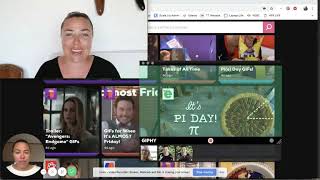
This is a YouTube video titled "Tina Tuesday Tech Tip - Giphy" created on March 18, 2019. The content features a single speaker presenting a tech tip about using Giphy to enhance emails with GIFs, including how to create custom GIFs from videos to make emails more engaging and entertaining.
Hi, welcome to today's Tina's Tuesday Tech Tip. And I know on my screen at the moment, it looks like there's a lot going on. It looks like a little bit of a mess. But today's Tuesday Tech tip is giphy. Now, one of my favorite things on text messages is to communicate with people via gifs. They just make me laugh. And so I've started adding them into emails as well. And so you can get giphy for emails. And so it's got all of these different things which, you know, when you are doing an email and someone signed up for something that you've got, like, just send them a gift like this. Where they do is just like, yeah, yeah. Or there's really good, like standing ovation ones where everyone's clapping, all of that sort of thing. Or if you're saying thank you to someone, it's like, thank you. So there's really, really good gifts that are coming up all the time that are just really funny, really adorable, and just give something different to your emails. You can also make your own GIFs. Like, there's always funny ones like that. So you can also make your own, which is what I like to do as well. So you can see there's a couple that I've been playing with that I've made before. So I've got the giphy capture, which you can see down the bottom here. I've added to my doc on my MacBook, which means that if I'm doing a video and, you know, I want to put a little clip within that email to get people to click on the video to watch more of it. It's a really good way because instead of kind of hyperlinking something and saying CL to view more, it's the video of me actually doing something. And so you can see one that I've done here before. It's just got over and over again like this. It's funny. It's something a little bit different to a plain text email. The way that you do that is when you've got a video up. So here's a video of me here. You get this giphy capture box and you place it over the video where you want it to go. And then here I can go. So you gotta be pretty quick with your fingers. Here you can go. You've gotta play. Hang on, let me get the play button there. I get her all the way up the top. I did this video way too close up. My head is too big. Okay, so then we've got. We'll play it here, and I look forward to talking to you again soon. Okay, so then we got that one. So now if we look at it. Oh, that stopped on a really bad place in my face. But now if we look at it, it's just like a wave. Hey. Hey. So it's just something a little bit different. But if you're looking to put something a little bit different into your emails so that it entices people to click, or you're just looking to give people a little bit of a laugh for their day, have a look at Giphy. You can download the gifts and put them within the body of your email. Like, let's get this party started. Let's do it Monday. Motivation, all of that sort of thing. So have a great week and have a play.