This is a YouTube video titled "Tina's Tuesday Tech Tip is... LOOM" created in November 2018. The content features a conversational tutorial with multiple speakers, including Tina Tower, explaining how to use the Loom Chrome extension for screen recording and video communication, aimed at business coaching and sharing instructional content.
Tina Tower and welcome to today's tech Tip.
So since I've started making these videos.
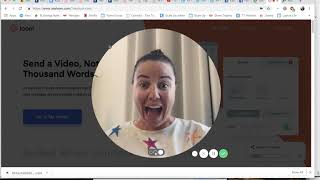
A lot of people have asked how I actually make the videos with my face down the bottom here and with the screen capture. And how I do that is with.
A Google Chrome extension called Loom. So this is a nice quick video. All I would suggest is going to.
Use loom.com and having a look and you can choose whether you would like to record your entire screen like I am now, which means you see all of my many tabs that I have left and all of the applications and.
Everything on my computer or you can choose just to show the window that you're operating in at the moment. But for the purposes of this video, I wanted to show you everything.
You can change the size of your head. Oh my gosh, I'm going to go really big. Here I come. I'm very big or I like it.
Little down the bottom because usually it's a way to show you what's going.
On whilst still having a little bit of me down the bottom. So then once you've got all of your videos there so you can see I use it quite a lot and.
I use it for a whole different range of things that I do. So with people that I am business.
Coaching, I will use it, you know, if they're asking just a quick question, I will use it to illustrate how to do something.
It's usually much quicker and more effective than sending a whole big long email.
And makes it really easy for the.
Person on the other end to know.
Exact where to go.
Click here, all of that sort of thing.
So really, really simple. And then once you've got your videos all stored, you can either send a link to someone for it or you.
Can download the video. So usually that's what I do is I download the videos, I don't send.
The links and then I will either.
Upload them onto Facebook or onto our members site or onto YouTube.
So really great way to communicate and really great way to show people stuff if you need to share a screen. So use Loom.