Tina Tower demonstrates Otter AI, a transcription tool that automatically converts audio to text. It's useful for recording meetings, interviews, and content creation without manually typing everything out.
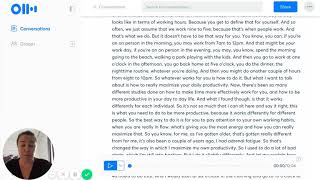
Hey. Okay. Welcome to the first session of Tina's Tuesday Tech Tips. So, each Tuesday, I will be putting up a video showing you a useful piece of software or technology that you can use in your business to make your life easier, more streamlined, more productive, and reach more people, make more sales, all of that sort of thing. So my first one I want to kick it off with is something that I've used just recently is Otter AI. So I only discovered it, I've used to always use for voice to text a program called Rev, but you paid a dollar a minute for automatic transcription. So this one is free for up to 80 minutes a month. And what it is, I'll show you how easily it works. So it's Otter AI, and there's a phone app and a desktop app. And so if you're writing blog posts, for example, but you find it quite difficult to write things out, you can just spell and it will type it out for you. Alternatively, I know I used to do a lot of voice memos on my phone while driving of ideas for articles and that sort of thing. And then I'd give them to my PA and she typed them out. So now you can just do this. So what you do is start recording. Okay. Okay. So I'm going to show you how easy it is to use Otter. So as you talk, you can see that it's transcribing what I'm saying. But what it's doing as I'm going is also also inserting in punctuation where it thinks it should be as well. It's a little bit hard when I talk because I have realized since I have done this that I do talk in disjointed sentences, and I do pause in random places, as do most people, when you're dictating something instead of writing it in a proper way. But it does take out all of my ums, and it does insert punctuation where it can there. So it uses some fantastic artificial intelligence, which you can see. So then that's all saved there in the note. The other awesome thing you can do is so that you can repurpose content that you already have. So say you have done podcast interviews before, or in my case, a lot of videos. So I. You can import a video into it. So this is a video that I've got on my program scale up, and it's put it all into text. So then what I can do is go through and pull out a couple of those things so that I can put them into blog posts as well. Now, what it does that I really, really like as well is it gets all the keywords out about what it is. So say I'm looking for something all about productivity. I can search in productivity and it will find me. Everything about productivity, how I've seen heard other people do it, that is really, really good is recording important meetings. So if you're going into say, legal meetings or pitch meetings or business coaching or anything like that and you want to record it, you can record your session and it'll transcribe everything and then say at a later date you want to find out what they said about the Harper case. You can search Harper and it will bring up all of the conversations or meetings that you've had about that. So really, really fantastic jump on it. As I said, 80 minutes per month for free. 80 minutes or 80 hours? I'm not sure. I have to check that. And then you can go into a paid version, which is quite affordable as well, but should save you heaps of time and money if you are a talker instead of a writer. Enjoy.