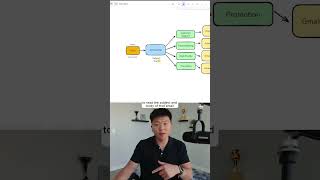
In this tutorial, the presenter demonstrates how to create an inbox automation agent using n8n. The workflow starts with adding a Gmail trigger that fires on a new message. Next, a Text Classifier AI node is inserted to read the email's subject and body and assign it to one of four categories (customer support, finance, billing, high priority, promotion). An initial execution fails because the AI service is not connected, prompting the presenter to link the AI credentials to the node. After connecting, the classifier successfully processes a sample customer support email, routing it to the appropriate branch while other categories remain empty. The video ends with a prompt to view the full breakdown via a play button.
Chapters
Here's how to build your first inbox agent in N8N. We know that we have to start this process with a Gmail trigger. So I'm gonna click on Add First Step. I'm going to type in Gmail and click on this button right here. And you can see right now, automatically this pops up with triggers. There's 26 different actions we can take, but it knows that there's nothing else on our workflow yet and it has to start with a trigger. So it prompts us to click on the On Message Received trigger. And then the event here is going to be a message received. Okay, cool. So now according to our wireframe, as you can see, the next step is we need to set up our AI classifier node to read the subject and body of that email and classify it in one of these 4 categories. So to do that, I'm gonna click on the plus right after the Gmail trigger, and I'm going to type text classifier, as you can see right here. So anyways, this was a customer support email example. I'm gonna go ahead and hit execute step, and what happens is we get an error. And the reason why is because we need to connect AI to this node, and we currently haven't connected AI. Now, if I go back into the text classifier and I hit execute step, it's actually going to work, and AI just read this email and looked look what it did. It output it in the customer support branch. You can see we have one item, and then finance, billing, high priority, and promotion, we have no items. So you can see now it sent it down the right path, just like we talked about in our wireframe of having the AI send it down a particular path. If you want to watch the full breakdown, then click on that play button right here, and I'll see you guys over there.