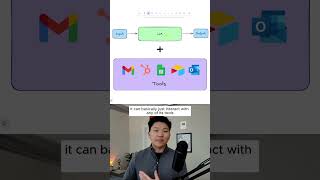
An AI agent is an LLM connected to tools like email and CRM systems that can autonomously invoke them to reach a goal, unlike a workflow that needs external orchestration. The difference: an agent researches and responds on its own when a CRM row appears, no copy-pasting required.
Chapters
All right, so AI agents, artificial intelligence, whatever it is, there is definitely a lot of hype. There's no denying that. And so the purpose of this section is just to make sure we can cut through all of that and actually understand what is an AI agent at its core, what can they do, and why do we need them. You probably heard, you know, digital employee or virtual assistant, all this kind of stuff, but we need to understand what that actually means and what powers them. So at this point, I'm sure we are all familiar with something like ChatGPT. Which is a large language model at its core. And so what we're looking at right here is a very simple visualization of how a large language model works, meaning right here in green, we have a large language model. Let's say it's ChatGPT, and we, the user, give it some sort of input. So maybe that's like, hey, help me write an email to John. The LLM would then take our input, process this, it would basically just create an email for us, and then it would spit that out as an output, and that's it. This LLM at its core cannot take any action. It's really not that practical. It just kind of helps you be more productive. Because at the end of the process, we'd have to take this output and copy and paste it into something that actually can take action, like Gmail. And so the power of these large language models really comes into play when we start to expose them to different tools. And tools just means any of these integrations that we use every single day within our work that let us actually do something. So whether that's send an email or update a row in our CRM or look at a database or Airtable, whatever it is, even Outlook, That's a tool. It just means connecting to an actual platform that we use to do something. So now instead of having the LLM help us write an email that we would copy and paste, or us exporting a Google Sheet and giving it to an LLM to analyze, it can basically just interact with any of its tools that we give it access to. So when we add an LLM to tools, we basically can get two different things, and that is either an AI workflow or an AI agent. So right away you can already tell what the difference is, but you can also see some similarities. So let's break it down. Starting with an AI workflow, we can see that we have an input similar to like we did up top with our LLM. But now instead of just going input, LLM, output, we can work in those tools right into the actual AI workflow itself. So what this could actually look like practically is we have our first tool, which is also an input, which is a new row in our CRM pops up. Then we're hitting another tool, which is Perplexity, where we're gonna do research about the lead. And then after that tool call, we're gonna use an LLM. If you wanna learn more like this, then click on that play button right here or go to my channel and watch the free 8-hour course that I just dropped. I'll see you guys over there.