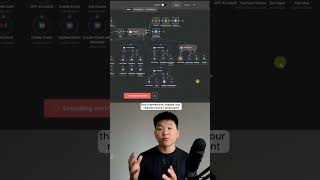
A single orchestrator AI agent in n8n delegates tasks to five specialized sub-agents: it finds high-performing YouTube videos about n8n, looks up Dexter Morgan's email, checks Chicago weather, and emails the results. Every action logs to a Google Sheet.
Chapters
I just built an agent swarm that can do anything in N8N. Please find me 4 high-performing YouTube videos about N8N and then send that as an email to Dexter Morgan. And then finally, also let me know about the weather today in Chicago. All right, so I just sent that off and now our agent's basically going to get that transcribed audio and now it's going to decide between its 5 different agents which ones to call. So you can already see it finished up calling the web agent to get the weather. It called the contact agent to get Dexter Morgan's email address. And now it's calling the YouTube agent in order to actually find YouTube videos that are high-performing and about NNN. And so that's the power of an agent swarm. This main orchestrator parent agent, all it has to do is understand, okay, I have 5 different agents, which ones should I use? Rather than saying, okay, I have like 30 tools, which tools do I use? And this framework makes our results more consistent and higher quality. Now that the agent has all it needs, it decides, okay, now I can call the email agent to send that email to Dexter Morgan. All right, so just finished up. I got my Telegram message back, but I'm just going to pull it up on my desktop so you guys can see it as well. It said, I have found 4 high-performing videos about N8N and sent them in an email to Dexter Morgan. When I hop over to my email, we can see that we just have one sent to dexter@miami.com and it has 4 high-performing videos about N8N. So that's awesome. It did what we wanted it to. It called the right agents. But not only did it do the right tasks, but it also logged everything so we can look and have full visibility. So that's exactly what's going on in this portion of the workflow. So if I head over to this Google Sheet, you can see that we have the time of the run, we have the inputs, we have the outputs, we have the actions that were taken, and then also how many tokens were used up. You wanna watch the full tutorial, click on that play button right here, and I'll see you guys over there.