Multi-Agent Systems Have NEVER Been EASIER to Build (n8n, no code)
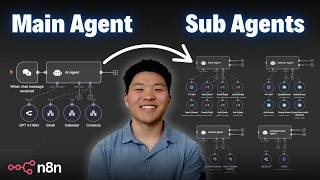
Dr. Violet Howard builds a multi-agent AI system in n8n where one orchestrator agent delegates tasks to specialized sub-agents for email, calendar, and contacts. The orchestrator interprets user intent and routes work to the right agent, each with its own tools and system prompt, making the system reusable and easier to debug than a single monolithic model.
Chapters
So a multi-agent system is one where we have multiple autonomous AI agents working together in order to get the job done, and they're able to talk to each other and they're able to use the tools that they have access to. What we're going to be talking about today is a type of multi-agent system called the orchestrator architecture. And basically what that means is that we have one agent up here. I call it the parent agent, and then I call these child agents, but we have an orchestrator agent that's able to call on different subagents. And the best way to think about it is this agent's only goal is to understand the intent of the user, whether that's through Telegram or through email, whatever it is, understanding that intent and then understanding, okay, I have access to these 4 agents and here is what each one is good at. Which one or which ones do I need to call in order to actually achieve the end goal? So in this case, if I'm saying to the agent, can you please write me a quick blog post about dogs and send that to Dexter Morgan? And can you also create a dinner event for tonight at 6:00 PM with Michael Scott? And thank you. Cool. So this is a pretty loaded task, right? And can you imagine if this one agent had access to all of these, like 15 or however many tools, and it had to do all of that itself, it would be pretty overwhelmed and it wouldn't be able to do it very accurately. So what you can see here is it is able to just understand, okay, I have these 4 agents. They each have a different role. Which ones do I need to call? And you can see what it's doing is it called the contact agent to get the contact information. Right now it's calling the content creator agent, and now that that's finished up, it's probably gonna call the calendar agent to make that event, and then it's gonna call the email agent in order to actually send that blog that we had the content creator agent make. And then you can see it also called this little tool down here called Think. If you wanna see a full video where I broke down what that does, you can watch it right up here. But we just got a response back from the orchestrator agent, so let's see what it said. All right, so it said the blog post about dogs has been sent to Dexter Morgan. A dinner event for tonight at 6:00 PM with Michael Scott has been created. "and if you need anything else, let me know." And just to verify that that actually went through, you can see we have a new event for dinner at 6:00 PM with Michael Scott, and then in our email, in our sent, we can see that we have a full blog post sent to Dexter Morgan. And you can see that we also have a link right here that we can click into, which means that the content creator agent was able to do some research, find this URL, create the blog post, and send that back to the orchestrator agent. And then the orchestrator agent remembered, "Okay, so I need to send a blog post to Dexter Morgan. I've got his email from the contact agent." I have the blog post from the content creator agent. Now all I have to do is pass it over to the email agent to take care of the rest. So yes, it's important to think about the tools because if this main agent had access to all those tools, it would be pretty overwhelming. But also think about the prompts. So in this ultimate assistant prompt, it's pretty short, right? All I had to say was, you're the ultimate assistant. Your job is to send the user's query to the correct tool. You should never be writing emails or ever creating summaries or doing anything. You just need to delegate the task. And then what we did is we said, okay, you have these 6 tools. Here's what they're called. Here's when you use them. And it's just super, super clear and concise. There's almost no room for ambiguity. We gave it a few rules, an example output, and basically that's it. And now it's able to interpret any query we might have, even if it's a loaded query. As you can see in this case, it had to call all 4 agents, but it still got it right. And then when it sends over something to like the email agent, for example, we're able to give this specific agent a very, very specific system prompt. Because we only have to tell it about, you only have access to these email tools. And this is just going back to the whole thing about specialization. It's not confusing. It knows exactly what it needs to do. Same thing with these other agents. You know, the calendar agent of course has its own prompts with its own set of calendar tools. The contact agent has its own prompt with its own set of contact tools. And then of course we have the content creator agent, which has to know how to not only do research using its Tably tool, but it also has to format the blog post with, you know, proper HTML. As you can see here, there was like a title, there were headings, there were, you know, inline links, all that kind of stuff. And so because we have all of this specialized, can you imagine if we had all of that system prompt thrown into this one agent and gave it access to all the tools? Just wouldn't be good. And if you're still not convinced, think about the fact that for each of these different tasks, because we know what each agent is doing, we're able to give it a very specific chat model. Because, you know, like for something like content creation, I like to use Claude 3.7. But I wouldn't want to use something as expensive as Cloud 3.7 just to get contacts or to add contacts to my contact database. So that's why I went with Flash here. And then for these ones, I'm using 4.1 Mini. So you're able to have a lot more control over exactly how you want your agents to run. And so I pretty much think I hit on a lot of that, but you know, benefits of multi-agent system, more reusable components. So now that we have built out, you know, an email agent, whenever I'm building another agent ever and I realize, okay, maybe it would be nice for this agent to have a couple email functions, Boom, I just give it access to the email agent because we've already built it, and this email agent can be called on by as many different workflows as we want. And when we're talking about reusable components, that doesn't have to just mean these agents are reusable. It could also be workflows that are reusable. So for example, if I go to this AI marketing team video, if you haven't watched it, I'll leave the link right up here. These tools down here, none of these are agents. They're all just workflows. So for example, if I click into the video workflow, you can see that it's sending data over to this workflow, and even though it's not an agent, it still is going to do everything it needs to do. And then send data back to that main agent. Similarly with this create image tool, if I was to click into it real quick, you can see that this is not an agent, but what it's gonna do is it's gonna take information from that orchestrator agent and do a very specific function. That way, this main agent up here, all it has to do is understand I have these different tools, which one do I need to use? So reusable components, and also we're gonna have model flexibility, different models for different agents. We're gonna have easier debugging and maintenance because like I said, with the whole prompting thing, If you tried to give that main agent access to 25 tools, and in the prompt you have to say, here's when you use all 25 tools, and it wasn't working, you wouldn't know where to start. You would feel really overwhelmed as to like, how do I even fix this prompt? So by splitting things up into small, small tasks and specialized areas, it's going to make it so much easier. Exactly like I just covered, point number 4, clear prompt logic and better testability. And then finally, it's a foundation for multi-turn agents or agent memory. Just because we're sending data from main agent to sub-agent doesn't mean we're losing that context of like, we're talking to Nate right now, or we're talking to Dave right now. We can still have that memory pass between workflows. So things get really, really powerful and it's just pretty cool. Okay, so we've seen a demo. I think you guys understand the benefits here. Just one thing I wanted to throw out before we get into like a live build of a multi-agent system is just because this is cool and there's benefits doesn't mean it's always the right thing to do. So if you're forcing a multi-agent orchestrator framework into a process that could be a simple single agent or a simple AI workflow, all you're gonna be doing is you're gonna be increasing the latency. You're gonna be increasing the cost because you're making more API calls, and you're probably gonna be increasing the amount of error just because kind of the golden rule is you want to eliminate as much data transfer between workflows as you can, because that's where you can run into like some issues. But of course, there are times when you do need. Dedicated agents for certain functions. So let's get into a new workflow and build a really simple example of an orchestrator agent that's able to call on a sub-agent. All right, so what we're gonna be doing here is we're gonna build an orchestrator agent. So I'm gonna hit tab, I'm gonna type in AI agents, and we're gonna pull this guy in, and we're just gonna be talking to this guy using that little chat window down here for now. So first thing we need to do as always is connect a brain. I'm gonna go ahead and grab an OpenRouter, and we're just gonna throw in a 4.1 mini. and I'll just change this name real quick so we can see what we're using. And from here, we're basically just gonna connect to a sub-workflow, and then we'll go build out that actual sub-workflow agent. So the way we do it is we click on this plus under tool, and what we wanna do is call n8n Workflow Tool, because you can see it says uses another n8n Workflow as a tool, allows packaging any n8n node as a tool. So it's super cool. That's how we can send data to these like custom things that we built out. As you saw earlier when I showed that little example of the marketing team agent, That's how we can do it. So I'm gonna click on this and basically when you click on this, there's a few things to configure. The first one is a description of when do you use this tool? You'll kind of tell the agent that here, and you'll also be able to tell a little bit in a system prompt, but you have to tell it when to use this tool. And then the next thing is actually linking the tool. So you can see, we can choose from a list of our different workflows in N8N. You can see I have a ton of different workflows here, but all you have to do is you have to choose the one that you want this orchestrator agent to send data to. And one thing I wanna call attention to here is this text box, which says the tool will call the workflow you define below, and it will look in the last node for the response. The workflow needs to start with an execute workflow trigger. So what does this mean? Let's just go build another workflow and we will see exactly what it means. So I'm gonna open up a new workflow, which is gonna be our sub-agent. So I'm gonna hit tab to open up the nodes, and it's obviously prompting us to choose a trigger. And we're gonna choose this one down here that says when executed by another workflow. Runs the flow when called by the Execute Workflow node from a different tool. So basically, the only thing that can access this node and send data to this node is one of these bad boys right here. So these two things are basically just connected, and data's gonna be sending between them. And what's interesting about this node is you can have a couple ways that you accept data. So by default, I usually just put it on Accept All Data, and this will put things into a field right here called Query. But if you wanted to, you could also have it send over specific fields. So if you wanted to only get like, you know, a phone number and you wanted to get a name and you wanted to get an email and you wanted those all to already be in 3 separate fields, that's how you could do that. And a practical example of that would be in my marketing team right here in the create image, you can see that I'm sending over an image title, an image prompt, and a chat ID. And that's another good example of being able to send, you know, like memory over because I have a chat ID coming from here, which is memory to the agent right here. but then I can also send that chat ID to the next workflow if we need memory to be accessed down here as well. So in this case, just to start off, we're not gonna be sending over specified fields. We're just gonna do accept all data and let us connect an AI agent to this guy. So I'm gonna type in AI agent. We'll pull this in. The first thing we need to do is we need to change this because we're not gonna be talking through the connected chat trigger node as we know because we have this trigger right here. So what we're gonna do is save this workflow. So now it should actually register in n8n that we have this workflow. I'm gonna go back in here and we're just gonna connect it so we know that it's called subwork— subagent. So grab that right there. And now you can see it says the subworkflow is set up to receive all input data. Without specific inputs, the agent will not be able to pass data to this tool. You can define the specific inputs in the trigger. So that's exactly what I just showed you guys with changing that right there. So what I want to do is show how data gets here so we can actually map it so the agent can read it. So what we need to do before we can actually test it out is we need to make sure that this Orchestrator agent understands what this tool will do and when to use it. So let's just say that this one's gonna be an email agent. First thing I'm gonna do is just intuitively name this thing Email Agent. I'm then going to type in the description, call this tool to take any email actions. So now it should basically, you know, signal to this guy, whenever I see any sort of query come in that has to do with email, I'm just gonna pass that query right off to this tool. So as you can see, I'm not even going to add a system message to this AI agent yet. We're just gonna see if we can understand. And I'm gonna come in here and say, please send an email to Nate asking him how he's doing. So we fire that off and hopefully it's gonna call this tool and then we'll be able to go in there and see the query that we got. The reason that this errored is because we haven't mapped anything. So what I'm gonna do is click on the tool, I'm gonna click on View Sub-Execution so we can pop open like the exact error that just happened. And we can see exactly what happened is that this came through in a field called query. But the main agent is not looking for a field called query. It's looking for a field called chat input. So I'm just going to click on debug and editor so we can actually pull this in. Now all I have to do is come in here, change this to define below, and then just drag in the actual query. And now we know that this sub-agent is always going to receive the orchestrator agent's message. But what you'll notice here is that the orchestrator agent sent over a message that says, hi Nate, just wanted to check in and see how you're doing. Hope all is well. So there's a mistake here because this main agent ended up basically like creating an email and sending it over. All we wanted to do is basically just pass the message along. So what I would do here is come into the system prompt and I'm just going to say, overview, you are an orchestrator agent. Your only job is to delegate the task to the correct tool. No need to write emails or create summaries. There we go. So just with a very simple line, that's all we're gonna do. And before we shoot that off, I'm just gonna go back into the sub-workflow and we have to give this thing an actual brain so that it can process messages. We're just gonna go with a 4.1 mini once again, save that so it actually reflects on this main agent. And now let's try to send off this exact same query and we'll see what it does this time. So it's calling the email agent tool. It shouldn't error because we, we, we fixed it. But as you can see now, it just called that tool twice. So we have to understand why did it just call the sub-agent twice? First thing I'm gonna do is click into the main agent and I'm gonna click on logs and we can see exactly what it did. So when it called the email agent, once again, it sent over a subject, which is checking in and an actual email body. So we have to fix the prompting there, right? But then the output, which is basically what that sub-workflow sent back, said, here's a slightly polished version of your message for a warm and clear tone, blah, blah, blah. And then for some reason it went and called that email agent again. So now it says, please send the following email, and it sends it over again. And then the sub-agent says, I can't send emails directly, but here's the email you can send. So they're both in this weird loop of thinking they are creating an email but not actually being able to send them. So let's take a look and see how we can fix that. All right, so back in the sub-workflow, what we want to do now is actually let this agent have the ability to send emails. Otherwise, they're just going to keep doing that endless loop. So I'm going to add a tool and type in Gmail. We're going to change this to a send message operation. I'm just going to rename this send email, and we're just going to have the to be defined by the model. We're going to have the subject be defined by the model, and we're going to have the message be defined by the model. And all this means is that ideally, you know, this query is going to say, hey, send an email to nate@example.com asking what's up. The agent would then interpret that and it would fill out, okay, who is it going to, what's the subject, and what's the message. It would basically just create it all itself. Using AI. And then the last thing I'm gonna do is just turn off the NNN attribution right there. And now let's give it another shot. And keep in mind, there's no system prompt in this actual agent. And I actually wanna show you guys a cool tip. So when you're building these multi-agent systems and you're doing things like sending data between flows, if you don't want to always go back to the main agent to test out like how this one's working, what you can do is come into here and we can just edit this query and just like set some mock data as if the main agent was sending over some stuff. So I'm gonna say like, we're pretending the orchestrator agent sent over to the sub-workflow, send an email to nate@example.com asking what's up, and we'll just get rid of that R. And then now you can see that's the query. That's exactly what this agent's going to be looking at right here. And if we hit play above this AI agent, we'll see that hopefully it's going to call that send email tool. And we'll see what it did. So just finished up. We'll click into the tool to see what it did. And as you can see, it sent it to Nate at Example. It made the subject checking in, and then the message was, hey Nate, just wanted to check in and see what's up. Best, your name. So my thought process right now is like, let's get everything working the way we want it with this agent before we go back to that orchestrator agent and fix the prompting there. So one thing I don't like is that it's signing off with best, your name. So we have a few options here. We could do that in a system prompt. But same thing with like specialization. If this tool is specialized in sending emails, we might as well instruct it how to send emails in this tool. So for the message, I'm going to add a description and I'm going to say always sign off emails as Bob. And that really should do it. So because we have this mock data right here, I don't have to go and, you know, send another message. I can just test it out again and see what it's going to do. So it's going to call the send email tool. It's gonna make that message, and now we will go ahead and look and see if it's signed off in a better way. Right here we can see now it's signing off, best Bob. So let's just say right now we're happy with the way that our sub agent's working. We can go ahead and come back into the main agent and test it out again. All right, so I'm just gonna shoot off that same message again that says, send an email to Nate asking him how he is doing. And this'll be interesting. We'll see what it sends over. It was one run and it says, could you please provide Nate's email address so I can send the message? So what happened here was the sub-execution realized we don't have Nate's email address, and that's why it basically responded back to this main agent and said, I need that if I need to send the message. So if I click on sub-execution, we will see exactly what it did and why it did that. And it probably didn't even call that send email tool. Yeah, so it actually failed. And it failed because it tried to fill out the to as Nate, and it realized that's not like a valid email address. So then because this sub-agent responds with, could you please provide Nate's email address so I can send the message? That's exactly what the main agent saw right here in the response from this agent tool. So that's how they're able to talk to each other, go back and forth. And then you can see that the orchestrator agent prompted us to actually provide Nate's email address. So now we're going to try, please send an email to nate@example.com asking him how the project is coming along. We'll shoot that off and everything should go through this time and it should basically say, oh, which project are you referring to? This will help me provide you with the most accurate and relevant update. So once again, The sub-agent is like, okay, I don't have enough information to send off that message, so I'm gonna respond back to that orchestrator agent. And just because we actually need one to get through, let me shoot off one more example. Okay, hopefully this one's specific enough. We have an email address, we have a specified name of a project, and we should see that hopefully it's gonna send this email this time. Okay, there we go. The email asking Nate how Project Pan is coming along. It's been sent. Anything else you need? So at this point it would be, okay, which other agents could I add to this system to make it a bit easier on myself? The first thing naturally to do would be I need to add some sort of contact agent, or maybe I realize that I don't need a full agent for that. Maybe that needs to just be one tool. So basically what I would do then is I'd add a tool right here. I would grab an Airtable because that's where my contact information lives. And all I want to do is go to contacts and choose contacts. And now I just need to change this to search. So now this tool's only job is to return all of the contacts in my Contact database. I'm just gonna come in here and call this contacts. And now keep in mind, once again, there's still nothing in the system prompt about here are the tools you have and here's what you do. I just wanna show you guys how intelligent these models can be before you even prompt them. And then once you get in there and say, okay, now you have access to these 7 agents, here's what each of them are good at, it gets even cooler. So let's try one more thing and see if it can use the combination of contact database and email agent. Okay, so I'm gonna fire this off, send an email to Dexter Morgan asking him if he wants to get lunch. You can see that right away it used the contacts database, pulled back Dexter Morgan's email address, and now we can see that it sent that email address over to the email agent, and now we have all of these different data transfers talking to each other, and hopefully it sent the email. All right, so here's that email. Hi Dexter, would you like to get lunch sometime soon? Best, Bob. The formatting's a little off. We could fix that within the, the tool for the email agent, but let's see if we sent that to the right email, which is dexter@miami.com. If we go into our contacts database, we can see right here we have Dexter Morgan, dexter@miami.com. And like I showed you guys earlier, what you want to do is get pretty good at reading these agent logs so you can see how your agents are thinking and what data they're sending between workflows. And if we go to the logs here, we can see first of all it used its GPT-4.1 mini model brain to understand what to do. It understood, okay, I need to go to the contacts table, so I got my contact information. Then I need to call the email agent, and what I sent over to the email agent was send an email to dexter@miami.com asking him if he wants to get lunch, and that was perfect. All right, so that's going to do it for this one. Hopefully this opened your eyes to the possibilities of these multi-agent systems in NNN, and also hopefully taught you some stuff, because I know all of this stuff is like really buzzwordy sometimes with all these agents, agents, agents, but there are use cases where it really is the best path. But it's all about like understanding what is the end goal and how do I want to evolve this workflow, and then deciding like what's the best architecture or system to use. So if you enjoyed the video or learned something new, please give it a like. Definitely helps me out a ton. And as always, I appreciate you guys making it to the end of the video. I'll see you guys in the next one. Thanks everyone.










