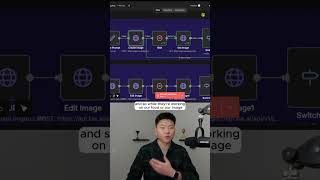
In this tutorial Dr. Violet Howard demonstrates how to use the Nanobanana Pro integration within the n8n workflow automation platform to generate hyper‑realistic images. She walks through a prepared workflow, uploading a personal photo and defining two distinct image prompts – a close‑up handshake between a man and Adam Sandler, and a hyper‑realistic view of the Chicago skyline at sunset. The demo shows the first API call that creates the image request and returns a task ID, likened to receiving a restaurant order number. A second API call polls the task status every five seconds using a switch node that routes the flow based on three possible outcomes: success, still processing, or failure. Once the task succeeds, a final API call retrieves the image URL, which is then downloaded, revealing detailed, high‑quality results. The video emphasizes the ease of setting up the nodes, the importance of polling, and the impressive visual fidelity of the generated images.
Chapters
Here's how to use the new Nanobanana Pro in AnyNN. All right, so we got the workflow ready. I'm going to open up this form and I'm going to drop in an image of myself. And for the image prompt, I'm saying a hyper-realistic image of this man shaking hands with Adam Sandler. It's close up enough to see extreme detail, but we can still see both people in frame. So I'm going to go ahead and shoot this off and I'll check in with you guys when we get that image. I don't even know what to say. This is ridiculously good. I really don't love the idea of zooming in close up on my face in front of the entire internet, but but this is incredible. Look at the amount of detail that they put into this image. So for our first example, the image prompt is in here, and I said a hyper-realistic image of the Chicago skyline at sunset. So I'm gonna go ahead and run this first row, and while this is running, I'll explain real quick how this all works. So you can see that we're making two different API calls. The first one that we're making is to actually create the image, and what happens after we do that first one is it comes back to us and it says, okay, cool, we got your request, and here is your task ID. So the way that I like to think about this is when you go and you order food at some sort of restaurant and they give you a number, this is basically the number that they give you and they're telling you, okay, we're going to work on your food. And so while they're working on our food or our image, what we have to do is wait. And then after it finishes waiting, we're going to make another API call. And this one is to get the image. It's going to check the status of our request or our food order. And so when we do this, you can see we have kind of this loop. This is called polling, which means every 5 seconds we're basically going to keep checking in to see if it's done. And so what happens is we do this switch node because when we check in on our order, they can basically tell us it worked, it's still generating, or it failed. And so we have 3 different paths for those 3 different scenarios. And then when it's done, we move over here to the result and we get this final URL, which I'll go ahead and download real quick. And we have our beautiful image of the Chicago skyline at sunset. And this is actually crazy. I mean, look at the water, look at the cars, look at the lights. Look at the sky. If you want to watch the full breakdown, then click on that play button right here, and I'll see you guys over there.