Dr. Violet Howard builds an n8n workflow that creates an AI agent receiving Slack messages and deciding whether to use Calendar or Gmail tools. The agent includes a chat model with memory, structured output parser, and Google Sheets logger. Howard walks through credentials setup, preparing a Google Sheet, and adding the Slack bot to a channel.
Chapters
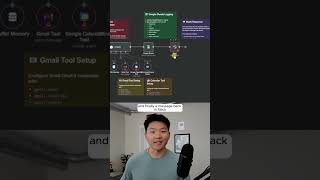
All right, so here we have our n8n developer AI agent, and I'm just gonna open up a chat, send off this message. Build me an AI agent that will receive a message in Slack, interpret the message, and decide if it needs to use its calendar or its Gmail tool, then log the results in Google Sheets and send us a message back in Slack. So I'll check in with you guys when that's finished up. Wow. I mean, that is absurd. We've got a Slack trigger set up that feeds into an AI agent that has a chat model, memory, Gmail tool, calendar tool, and a structured output parser. Then we have our Google Sheets logger, and finally a message back in Slack. You can also see that we have tons of sticky notes, so we're able to get set up and we understand what exactly needs to be configured. So as you can see, the workflow tells us how to get started. We need to configure all the credentials, which is everything that's red. We need to set up the Google Sheet with proper headers. We need to add the Slack bot to our channel and then just start testing. It also tells us what to do with the Slack trigger, what to do with the AI agent, what to do with these tools down here. But I mean, this is wild. If we click into the AI agent, we can see that it has the proper user message already mapped. and it also has a system prompt. So let's open this up real quick. It's not too in-depth, but it says you're a helpful AI assistant that helps with calendar and email tasks. It lists the two tools, which are Calendar and Gmail, and always provide a clear explanation of what action you took and what the result was. If you guys remember, there was a structured output parser already attached, and if we click into here, we can see that the agent's going to output the action that was performed, which tool was used, a summary of the result, and the message to send back to the user in Slack. If you wanna watch the full tutorial, click that play button right here, and I'll see you guys over there.