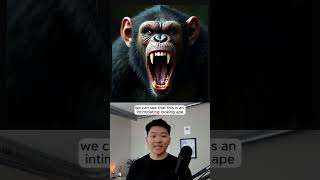
Dr. Violet Howard builds a fully automated workflow that generates viral shorts from start to finish. An AI agent creates eight fight scenes between animals, generates 16 close-up images, picks a winner, renders video with Creatomate, and posts to Instagram, TikTok, and YouTube. The demo shows an ape versus big cats example working in real time.
Chapters
I just 100% automated viral Shorts. Okay, so you can already see there's kind of like 5 main blocks, which is first of all, we're going to be creating the scenes, then we're going to be creating those close-up images, then we're going to be creating the winner images. From there, we're going to pull all of the pictures back in, render the final video together, and then we're sending it off to Instagram, TikTok, and YouTube to be published. Okay, so for this run, as you can see based on our Google Sheet, this is going to be ape versus big cats, and it's going to pull in because we have this marked as to-do. So I'm going to go back into the workflow, I'm going to hit test workflow, and we're basically just going to watch this thing start. So after this, we move on to the next step, which is the Scene Creator agent. And you can see what we give this agent as the user message is two things. The first thing is the main character, and then the second thing is the type of opponent. So basically this agent's job is to take the main character and the opponents, and as you can see on the right-hand side, it spits out 8 different scenes, which are the 8 different opponents that the main character is going to be fighting in this YouTube Short. Anyways, what we do is we feed those 8 items into this image prompt generator where we're going to be giving this agent the main animal and the opponent. So now you can see we have 16 items and these are all 16 of our images. And if I was to click into the URL that it returns for item 1, we can see that this is an intimidating looking ape that is roaring at us. All right. So now that we have all of our close-up images done, we can move on to the next section of the workflow, which is creating the winner images. So what we're doing here is once again, we're prompting an AI agent and we're gonna give it two different animals. So up here we have animal1, animal2. And as you can see on this right-hand side, what we get back are 8 different image prompts. And each of these image prompts are going to contain, you know, like which of these animals actually won the fight. But after we send over these 8 different scenes, it's gonna do the exact same thing where it tells us, okay, we got your request, we're processing it, please wait a little bit. So we go ahead and wait 90 seconds, we check back in, and then we grab all of the completed images. So let's scroll down to a random one down here and we will see who won this fight. Okay, so it looks like this one was a tiger that clearly beat up this ape. Okay, cool. So we have all 24 elements. You can see the final video is already done, but the next section of the workflow is to render it all together. So what we're doing here is we're hitting an API called Creatomate. And if I click into Creatomate, you can see here all of my renders, and this is our completed video. And then we're going to go ahead and do the same thing where we check back in on the video, and you can see we get it right here as a binary file. So let's take a quick little sneak peek. If you want to watch the full video and get all the resources you need for free, then click right here, and I'll see you guys over there.