Walk through a Cognifit cognitive assessment on Talent LMS from start to finish. You'll set up an account, then work through five timed tasks: clicking fast in a rectangle, spotting circles among hexagons, comparing shape sizes, matching colors to words, and juggling spatial and number challenges.
Chapters
Okay, so I'm going to be showing you how to take this cognitive assessment as a user. So the assessment will come to your email that's registered with your Talent LMS account. So go to your profile in Talent LMS to make sure that it's the right one. Now, for me, it came into my promotions inbox from Cognifit. I'll click into that and then I'll click on join now. Okay, Then since I don't have an account yet, I'm going to go and click on sign up, And then personalize my profile. I'll add a password, hit continue, save the password, add in my gender, date of birth. Very good. And hit continue. So then I hit continue. I hit yes again. Okay. And then I begin the exam. And I hit start. Okay, now I answer the questions. I'd say good. Touchpad. Yep, yep. Yes. No. Yeah, yeah, yep, yep, yep. Yeah. Yes. Yeah. Solid. Nine. Yep. Nope. Yes. Yes. Yep, yep, yep, yep. See? Excellent. Good. Eight. Yeah, Yep. Yeah, yeah. Nice. Excellent. Yeah, yeah. Okay, let's do it. Okay, so once we finish that initial questionnaire with all those questions, we are going to hit start. So go watch instructional video first. Hi.
In this task, you're going to place the cursor on top of a horizontal rectangle that you'll see on the screen. You're going to click as fast as you can on that rectangle for the allotted time. I going to try it now, and
let's see how I do. Okay.
Okay, so I'm clicking as fast as I can, and you have to be very careful to not have the cursor move out of the rectangle.
Okay, so right. Start. Hit start. Okay, so I'm going hit the button five times. 1, 2, 3, 4. And then we're going to say yes, start the test. We're going to go as fast as possible here. Oh, man. Okay, very good. Next one.
Watch a short time in this cast. You have to click dead center in the circles that appear on the screen. Now, sometimes hexagons will also appear on the screen, and you're supposed to ignore them. Let's try now.
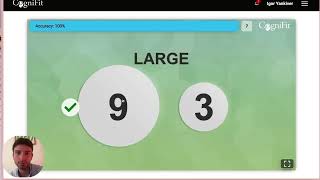
Okay, Just the circles. Okay. Okay, let's do just the circles. Start. Circle, circle, circle. Yep. Start test. Circle, circle, circle, circle, circle, circle, circle, circle, circle, circle, circle, circle, circle, circle, circle, circle, circle, circle, circle, circle, circle, circle. Cool. All right, let's start. Let's do bigger. Bigger. Oh, ser. Click on the bigger figure. Not a bigger number. They're just a bigger figure. Okay, let's do it. Highest value. Because now we have to do the highest value on the bigger figure. Okay. 3, 8, 4, 9. 3, 9. 3, 7. 4, 9. 4, 7. 4, 5, 7, 9. Cool. All right, what's the next one?
Hello and welcome. So if you check out the screen, you'll see a little bar. And in that bar, you're going to see a word. That word is the name of a color. Now you're going to pay at the
bottom and hit start. Start. Green. Oh, no. All right. Start test. Yes. No, no, space. No, no. Okay. All right, this last one is divided. Attention. Let's give it a go. Okay, so. Okay, so it has to be on top of the ball, and it has to match. Yeah. Oh, man. 470. Well, that makes sense. Okay, so once that's done, we can just exit out and. Yeah, we'll get a more detailed result later. Yeah, that's all. That's the whole thing.